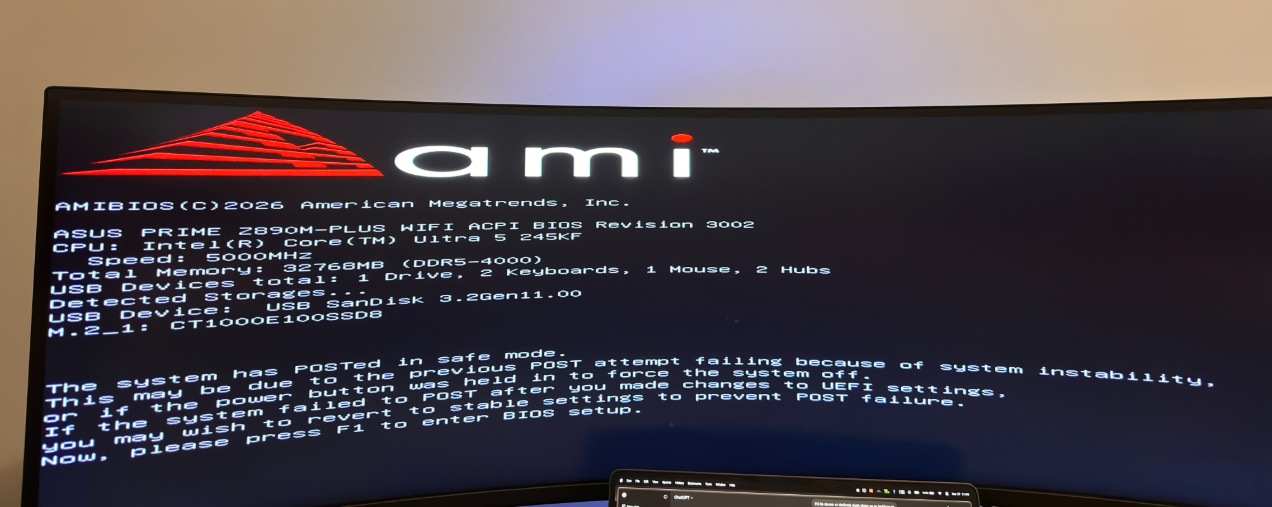
..........
*******************************************************************************
*                                                                             *
*                        Bugcheck Analysis                                    *
*                                                                             *
*******************************************************************************

KMODE_EXCEPTION_NOT_HANDLED (1e)
This is a very common BugCheck.  Usually the exception address pinpoints
the driver/function that caused the problem.  Always note this address
as well as the link date of the driver/image that contains this address.
Arguments:
Arg1: ffffffffc0000005, The exception code that was not handled
Arg2: fffff802ef0b38a7, The address that the exception occurred at
Arg3: 0000000000000000, Parameter 0 of the exception
Arg4: ffffffffffffffff, Parameter 1 of the exception

Debugging Details:
------------------

*************************************************************************
***                                                                   ***
***                                                                   ***
***    Either you specified an unqualified symbol, or your debugger   ***
***    doesn't have full symbol information.  Unqualified symbol      ***
***    resolution is turned off by default. Please either specify a   ***
***    fully qualified symbol module!symbolname, or enable resolution ***
***    of unqualified symbols by typing ".symopt- 100". Note that     ***
***    enabling unqualified symbol resolution with network symbol     ***
***    server shares in the symbol path may cause the debugger to     ***
***    appear to hang for long periods of time when an incorrect      ***
***    symbol name is typed or the network symbol server is down.     ***
***                                                                   ***
***    For some commands to work properly, your symbol path           ***
***    must point to .pdb files that have full type information.      ***
***                                                                   ***
***    Certain .pdb files (such as the public OS symbols) do not      ***
***    contain the required information.  Contact the group that      ***
***    provided you with these symbols if you need this command to    ***
***    work.                                                          ***
***                                                                   ***
***    Type referenced: ExceptionRecord                               ***
***                                                                   ***
*************************************************************************
*************************************************************************
***                                                                   ***
***                                                                   ***
***    Either you specified an unqualified symbol, or your debugger   ***
***    doesn't have full symbol information.  Unqualified symbol      ***
***    resolution is turned off by default. Please either specify a   ***
***    fully qualified symbol module!symbolname, or enable resolution ***
***    of unqualified symbols by typing ".symopt- 100". Note that     ***
***    enabling unqualified symbol resolution with network symbol     ***
***    server shares in the symbol path may cause the debugger to     ***
***    appear to hang for long periods of time when an incorrect      ***
***    symbol name is typed or the network symbol server is down.     ***
***                                                                   ***
***    For some commands to work properly, your symbol path           ***
***    must point to .pdb files that have full type information.      ***
***                                                                   ***
***    Certain .pdb files (such as the public OS symbols) do not      ***
***    contain the required information.  Contact the group that      ***
***    provided you with these symbols if you need this command to    ***
***    work.                                                          ***
***                                                                   ***
***    Type referenced: ContextRecord                                 ***
***                                                                   ***
*************************************************************************

KEY_VALUES_STRING: 1

    Key  : AV.Page.Virtual
    Value: 0xffffffffffff0000

    Key  : AV.Type
    Value: Read

    Key  : Analysis.CPU.mSec
    Value: 2890

    Key  : Analysis.Elapsed.mSec
    Value: 2890

    Key  : Analysis.IO.Other.Mb
    Value: 0

    Key  : Analysis.IO.Read.Mb
    Value: 1

    Key  : Analysis.IO.Write.Mb
    Value: 0

    Key  : Analysis.Init.CPU.mSec
    Value: 953

    Key  : Analysis.Init.Elapsed.mSec
    Value: 40986

    Key  : Analysis.Memory.CommitPeak.Mb
    Value: 81

    Key  : Analysis.Version.DbgEng
    Value: 10.0.29507.1001

    Key  : Analysis.Version.Description
    Value: 10.2511.5.1 amd64fre

    Key  : Analysis.Version.Ext
    Value: 1.2511.5.1

    Key  : Bugcheck.Code.LegacyAPI
    Value: 0x1e

    Key  : Bugcheck.Code.TargetModel
    Value: 0x1e

    Key  : Dump.Attributes.AsUlong
    Value: 0x21008

    Key  : Dump.Attributes.DiagDataWrittenToHeader
    Value: 1

    Key  : Dump.Attributes.ErrorCode
    Value: 0x0

    Key  : Dump.Attributes.KernelGeneratedTriageDump
    Value: 1

    Key  : Dump.Attributes.LastLine
    Value: Dump completed successfully.

    Key  : Dump.Attributes.ProgressPercentage
    Value: 0

    Key  : Failure.Bucket
    Value: AV_nt!KiDispatchException

    Key  : Failure.Exception.IP.Address
    Value: 0xfffff802ef0b38a7

    Key  : Failure.Exception.IP.Module
    Value: nt

    Key  : Failure.Exception.IP.Offset
    Value: 0x6b38a7

    Key  : Failure.Hash
    Value: {00781d15-b897-afab-75cd-f83221cbf387}

    Key  : Faulting.IP.Type
    Value: Paged

    Key  : Stack.Pointer
    Value: PRCBException


BUGCHECK_CODE:  1e

BUGCHECK_P1: ffffffffc0000005

BUGCHECK_P2: fffff802ef0b38a7

BUGCHECK_P3: 0

BUGCHECK_P4: ffffffffffffffff

FILE_IN_CAB:  032726-10812-02.dmp

DUMP_FILE_ATTRIBUTES: 0x21008
  Kernel Generated Triage Dump

FAULTING_THREAD:  ffffbb8f37c1b080

EXCEPTION_PARAMETER1:  0000000000000000

EXCEPTION_PARAMETER2:  ffffffffffffffff

READ_ADDRESS: fffff802ef9c44c8: Unable to get MiVisibleState
Unable to get NonPagedPoolStart
Unable to get NonPagedPoolEnd
Unable to get PagedPoolStart
Unable to get PagedPoolEnd
unable to get nt!MmSpecialPagesInUse
 ffffffffffffffff

CUSTOMER_CRASH_COUNT:  2

PROCESS_NAME:  dwm.exe

TRAP_FRAME:  20c4834830245c8b -- (.trap 0x20c4834830245c8b)
Unable to read trap frame at 20c48348`30245c8b
Resetting default scope

IP_IN_PAGED_CODE:
nt!ExpInterlockedPopEntrySListFault+0
fffff802`ef0b38a7 498b08          mov     rcx,qword ptr [r8]

STACK_TEXT:
ffffa880`4f1698b8 fffff802`eede8c2b     : 00000000`0000001e ffffffff`c0000005 fffff802`ef0b38a7 00000000`00000000 : nt!KeBugCheckEx
ffffa880`4f1698c0 fffff802`ef0aaef2     : e80f8b48`10c28348 483b8948`fffce0b0 20c48348`30245c8b cccccccc`ccccc35f : nt!KiDispatchException+0x91b
ffffa880`4f169fb0 fffff802`ef0aaec0     : fffff802`ef0bee3e fffffa05`08bdf4e0 00000000`00000003 fffffa05`08bdf4e0 : nt!KxExceptionDispatchOnExceptionStack+0x12
fffffa05`08bdef38 fffff802`ef0bee3e     : fffffa05`08bdf4e0 00000000`00000003 fffffa05`08bdf4e0 00000000`00000000 : nt!KiExceptionDispatchOnExceptionStackContinue
fffffa05`08bdef40 fffff802`ef0b9b25     : 00000000`00000000 0000ffff`00001fb3 00000000`00000000 00000000`00000000 : nt!KiExceptionDispatch+0x13e
fffffa05`08bdf120 fffff802`ef0b38a7     : 00000000`00000005 fffff802`eecf4560 00000000`00000000 00000000`00000000 : nt!KiGeneralProtectionFault+0x365
fffffa05`08bdf2b0 fffff802`eecf4560     : 00000000`00000000 00000000`00000000 00000000`00000000 00000000`00000000 : nt!ExpInterlockedPopEntrySListFault
fffffa05`08bdf2c0 fffff802`eecfcf14     : 00000000`00000000 00000000`00000000 00000000`00000000 00000000`00000039 : nt!MiGetPage+0x3b0
fffffa05`08bdf410 fffff802`eecfe691     : 00000000`00000000 00000000`00000000 fffffa05`08bdf5c0 fffffa05`08bdf990 : nt!MiGetPageChain+0x154
fffffa05`08bdf4c0 fffff802`eecfc846     : 0010005f`00000009 00000000`00000000 ffffffff`ffffffff ffffbb8f`37a60480 : nt!MiResolvePrivateZeroFault+0x621
fffffa05`08bdf680 fffff802`eecfdeb2     : 00000058`3e18a6f8 00000000`00000002 00007ffc`c112baac fffff802`ef0beeff : nt!MiResolveDemandZeroFault+0x246
fffffa05`08bdf820 fffff802`eec1695e     : 00000000`00000000 00000000`00000014 00000000`00000000 00000000`00000000 : nt!MiUserFault+0x952
fffffa05`08bdf8b0 fffff802`ef0b9ecb     : 00007ffc`d79908d1 00007ffc`d79908d1 00007ffc`d7b24db8 00000000`00000000 : nt!MmAccessFault+0x20e
fffffa05`08bdfa20 00007ffc`d79905b2     : 00000000`00000000 00000000`00000000 00000000`00000000 00000000`00000000 : nt!KiPageFault+0x38b
00000058`3e188fd0 00000000`00000000     : 00000000`00000000 00000000`00000000 00000000`00000000 00000000`00000000 : 0x00007ffc`d79905b2


SYMBOL_NAME:  nt!KiDispatchException+91b

MODULE_NAME: nt

IMAGE_NAME:  ntkrnlmp.exe

IMAGE_VERSION:  10.0.26100.8036

STACK_COMMAND: .process /r /p 0xffffbb8f37a60080; .thread 0xffffbb8f37c1b080 ; kb

BUCKET_ID_FUNC_OFFSET:  91b

FAILURE_BUCKET_ID:  AV_nt!KiDispatchException

OSPLATFORM_TYPE:  x64

OSNAME:  Windows 10

FAILURE_ID_HASH:  {00781d15-b897-afab-75cd-f83221cbf387}

Followup:     MachineOwner