Katılım
22 Aralık 2023
Mesajlar
743
Çözümler
4
Beğeniler
426
Yer
Turkiye
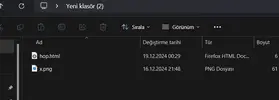
Kısacık bir kod var yazdığım HTML CSS JS ufaktan bir sunu gibi böyle en son fotoğraf çıkması gerekiyor, telefonda açılacağı için kendim telefonda deniyorum. ZIP dosyası yapıp mail üzerinden yolluyorum fakat görsel bir türlü yüklenmiyor? ZIP dosyası olmadan nereden gönderebilirim? Sorun nedir aynı klasörün içindeki HTML ve PNG dosyası bunlar.
 
Görsel yüklenmiyor derken? <img src="????.png"> kısmı düzgün mü?
Eğer çok önemli değil ise görseli hizliresim.com'a yüklersin. Kaynak kodlarını codepen.io'ya. Codepen linkini açarsın bu iş tamamdır.

ya da hizliresim'e yüklediğin görsel bağlantısını src kısmına eklersin resmi zip dosyasına ekleyip göndermezsin. Görseli internetten çeker.
Eğer internette yoksa src kısmında base64 olarak eklersin. Görseli Base64 formatına çevirme.
Base64 formatını görüntüleme.
 
Son düzenleme:
Yazdığınız kodu tahmin mi etmemiz gerekiyor? Bu şekilde yardımcı olabilmemiz mümkün değil.
HTML:
<!DOCTYPE html>
<html lang="en">
<head>
    <meta charset="UTF-8">
    <meta name="viewport" content="width=device-width, initial-scale=1.0">
    <title>x Open</title>
    <style>
        body {
            margin: 0;
            padding: 0;
            background-color: hwb(0 0% 100%);
            font-family: 'Courier New', Courier, monospace;
            color: hwb(290 29% 20%);
        }

        #screen {
            display: flex;
            justify-content: center;
            align-items: center;
            height: 100vh;
            position: relative;
        }

        #terminal {
            background-color: black;
            padding: 20px;
            border: 2px solid hwb(290 29% 20%);
            border-radius: 5px;
            width: 80%;
            max-width: 600px;
        }

        #password-screen {
            background-color: black;
            padding: 20px;
            border: 2px solid hwb(290 29% 20%);
            border-radius: 5px;
            width: 80%;
            max-width: 600px;
            text-align: center;
        }

        #password-content input {
            background-color: black;
            color: hwb(290 29% 20%);
            border: 2px solid hwb(290 29% 20%);
            padding: 10px;
            margin: 10px 0;
            width: 100%;
            max-width: 250px;
            border-radius: 5px;
        }

        #password-content button {
            background-color: hwb(290 29% 20%);
            color: black;
            font-size: 1.2em;
            padding: 10px 20px;
            border: none;
            border-radius: 5px;
            cursor: pointer;
        }

        #desktop-image {
            width: 100%;
            height: 100vh;
            object-fit: cover;
            margin-bottom: 20px;
            display: block;
            transition: all 0.5s ease;
        }

        #link-button {
            background-color: #9900ff00;
            color: white;
            font-size: 1.2em;
            padding: 10px 20px;
            border: none;
            border-radius: 5px;
            cursor: pointer;
            position: absolute;
            top: 50%;
            left: 50%;
            transform: translate(-50%, -50%);
        }

        #link-button:hover {
            background-color: #a600ff00;
        }

        #heart-icon {
            font-size: 2em;
            margin-right: 10px;
        }
    </style>
</head>
<body>
    <div id="screen">
        
        <div id="terminal">
            <p>Starting x...</p>
            <p id="loading-text"></p>
        </div>
        
        
        <div id="password-screen" style="display:none;">
            <div id="password-content">
                <h1>Welcome home. please enter the password;)</h1>
                <input type="password" id="password" placeholder="Enter password">
                <button id="submit-password">Submit</button>
                <p id="error-message" style="color: red;"></p>
            </div>
        </div>

    
        <div id="desktop" style="display:none;">
            <div id="desktop-content">
                <img id="desktop-image" src="x.png" alt="Desktop Image">
                <button id="link-button">
                    <span id="heart-icon">🐈</span>
                </button>
            </div>
        </div>
    </div>
    <script>
        let loadingText = document.getElementById('loading-text');
        let messages = [
            "System is starting...",
            "Loading...",
            "Scanning file system...",
            "Establishing connections...",
            "System successfully started!"
        ];
        let i = 0;

        function showMessage() {
            if (i < messages.length) {
                loadingText.innerText = messages[i];
                i++;
                setTimeout(showMessage, 2000);
            } else {
                
                setTimeout(() => {
                    document.getElementById('terminal').style.display = 'none';
                    document.getElementById('password-screen').style.display = 'block';
                }, 2000);
            }
        }

        showMessage();

        
        document.getElementById('submit-password').addEventListener('click', function() {
            let enteredPassword = document.getElementById('password').value;
            if (enteredPassword === '8851') {
                document.getElementById('password-screen').style.display = 'none';
                document.getElementById('desktop').style.display = 'block';
                document.getElementById('desktop-image').src = 'x.png';
            } else {
                document.getElementById('error-message').innerText = "Incorrect password. Try again.";
            }
        });

        
        document.getElementById('link-button').addEventListener('click', function() {
            window.open('randomwebsite', '_blank');
        });
    </script>
</body>
</html>

Buyrun, anlatmaya çalıştığım olay kendi klasörümdeyken bir problem yok başka birine ZIP dosyası olarak gönderdim, ZIP'i ayıkladıktan sonraki dosya bu aynı dosya? Fakat başka bir bilgisayarda denememe rağmen olmadı. İlk sorduğumda telefonda açarken sorun çıkarmasıydı ZIP dosyasıyla alakalı bir durum mu bu yani?

1734557490939.webp

Görsel yüklenmiyor derken? <img src="????.png"> kısmı düzgün mü?
Eğer çok önemli değil ise görseli hizliresim.com'a yüklersin. Kaynak kodlarını codepen.io'ya. Codepen linkini açarsın bu iş tamamdır.

ya da hizliresim'e yüklediğin görsel bağlantısını src kısmına eklersin resmi zip dosyasına ekleyip göndermezsin. Görseli internetten çeker.
Eğer internette yoksa src kısmında base64 olarak eklersin. Görseli Base64 formatına çevirme.
Base64 formatını görüntüleme.
Hocam bir bakın isterseniz pek bir bilgim yok bu konuda dediğim gibi sadece kendim denemiştim. Görsel benim için önemliydi onun için internet bağlantısıyla yüklemek istememiştim. Base64 formatı içinde dün Base64 Image Encoder şu siteyi denemiştim ne hikmetse kod alamamıştım yanlış bir site mi?
 
HTML:
<!DOCTYPE html>
<html lang="en">
<head>
    <meta charset="UTF-8">
    <meta name="viewport" content="width=device-width, initial-scale=1.0">
    <title>x Open</title>
    <style>
        body {
            margin: 0;
            padding: 0;
            background-color: hwb(0 0% 100%);
            font-family: 'Courier New', Courier, monospace;
            color: hwb(290 29% 20%);
        }

        #screen {
            display: flex;
            justify-content: center;
            align-items: center;
            height: 100vh;
            position: relative;
        }

        #terminal {
            background-color: black;
            padding: 20px;
            border: 2px solid hwb(290 29% 20%);
            border-radius: 5px;
            width: 80%;
            max-width: 600px;
        }

        #password-screen {
            background-color: black;
            padding: 20px;
            border: 2px solid hwb(290 29% 20%);
            border-radius: 5px;
            width: 80%;
            max-width: 600px;
            text-align: center;
        }

        #password-content input {
            background-color: black;
            color: hwb(290 29% 20%);
            border: 2px solid hwb(290 29% 20%);
            padding: 10px;
            margin: 10px 0;
            width: 100%;
            max-width: 250px;
            border-radius: 5px;
        }

        #password-content button {
            background-color: hwb(290 29% 20%);
            color: black;
            font-size: 1.2em;
            padding: 10px 20px;
            border: none;
            border-radius: 5px;
            cursor: pointer;
        }

        #desktop-image {
            width: 100%;
            height: 100vh;
            object-fit: cover;
            margin-bottom: 20px;
            display: block;
            transition: all 0.5s ease;
        }

        #link-button {
            background-color: #9900ff00;
            color: white;
            font-size: 1.2em;
            padding: 10px 20px;
            border: none;
            border-radius: 5px;
            cursor: pointer;
            position: absolute;
            top: 50%;
            left: 50%;
            transform: translate(-50%, -50%);
        }

        #link-button:hover {
            background-color: #a600ff00;
        }

        #heart-icon {
            font-size: 2em;
            margin-right: 10px;
        }
    </style>
</head>
<body>
    <div id="screen">
       
        <div id="terminal">
            <p>Starting x...</p>
            <p id="loading-text"></p>
        </div>
       
       
        <div id="password-screen" style="display:none;">
            <div id="password-content">
                <h1>Welcome home. please enter the password;)</h1>
                <input type="password" id="password" placeholder="Enter password">
                <button id="submit-password">Submit</button>
                <p id="error-message" style="color: red;"></p>
            </div>
        </div>

   
        <div id="desktop" style="display:none;">
            <div id="desktop-content">
                <img id="desktop-image" src="x.png" alt="Desktop Image">
                <button id="link-button">
                    <span id="heart-icon">🐈</span>
                </button>
            </div>
        </div>
    </div>
    <script>
        let loadingText = document.getElementById('loading-text');
        let messages = [
            "System is starting...",
            "Loading...",
            "Scanning file system...",
            "Establishing connections...",
            "System successfully started!"
        ];
        let i = 0;

        function showMessage() {
            if (i < messages.length) {
                loadingText.innerText = messages[i];
                i++;
                setTimeout(showMessage, 2000);
            } else {
               
                setTimeout(() => {
                    document.getElementById('terminal').style.display = 'none';
                    document.getElementById('password-screen').style.display = 'block';
                }, 2000);
            }
        }

        showMessage();

       
        document.getElementById('submit-password').addEventListener('click', function() {
            let enteredPassword = document.getElementById('password').value;
            if (enteredPassword === '8851') {
                document.getElementById('password-screen').style.display = 'none';
                document.getElementById('desktop').style.display = 'block';
                document.getElementById('desktop-image').src = 'x.png';
            } else {
                document.getElementById('error-message').innerText = "Incorrect password. Try again.";
            }
        });

       
        document.getElementById('link-button').addEventListener('click', function() {
            window.open('randomwebsite', '_blank');
        });
    </script>
</body>
</html>

Buyrun, anlatmaya çalıştığım olay kendi klasörümdeyken bir problem yok başka birine ZIP dosyası olarak gönderdim, ZIP'i ayıkladıktan sonraki dosya bu aynı dosya? Fakat başka bir bilgisayarda denememe rağmen olmadı. İlk sorduğumda telefonda açarken sorun çıkarmasıydı ZIP dosyasıyla alakalı bir durum mu bu yani?

Eki Görüntüle 108421


Hocam bir bakın isterseniz pek bir bilgim yok bu konuda dediğim gibi sadece kendim denemiştim. Görsel benim için önemliydi onun için internet bağlantısıyla yüklemek istememiştim. Base64 formatı içinde dün Base64 Image Encoder şu siteyi denemiştim ne hikmetse kod alamamıştım yanlış bir site mi?
Benim eklediğim siteleri inceleyiniz. Bu site çalışmıyor sanırsam.
 
Yöntemleriniz yanlış. Mail üzerinden göndermeniz saçma. Bir Web sunucusuna yükleyin orada çalışsın. ZIP dosyası konu dışı. Olayın ZIP dosyasıyla bir alakası yok.
 
Yöntemleriniz yanlış. Mail üzerinden göndermeniz saçma. Bir Web sunucusuna yükleyin orada çalışsın. ZIP dosyası konu dışı. Olayın ZIP dosyasıyla bir alakası yok.
Mesele zaten mailden yollamamla çalışmasıydı saçmaysa benim yapmak istediğim bu? Şu yanlış bu yanlış demektense olayı söyleyin o halde. Yanlış yöntemim mail yoluyla veya mesajla yollamam ise kusura bakmayın başka türlü işimi görmeyecek teşekkürler. :thumbsup:
 
Mesele zaten mailden yollamamla çalışmasıydı saçmaysa benim yapmak istediğim bu? Şu yanlış bu yanlış demektense olayı söyleyin o halde. Yanlış yöntemim mail yoluyla veya mesajla yollamam ise kusura bakmayın başka türlü işimi görmeyecek teşekkürler. :thumbsup:
Mailden link yollasanız peki? Veya iframe? Iframe aşar mı?