
Herkese merhaba,
Bilgisayarınızda DNS değiştirmek istediğinizde ağ ayarlarına girip mevcut ağa tıklayıp oradan gelişmiş özelliklerden tek tek DNS yazmayın diye basit bir uygulama kodladım. Bu uygulama ile ekranda yazan yaygın 6 DNS arasında tek tık ile geçiş yapabilir ayrıca isterseniz yine tek tıklama ile DNS ayarlarınızı sıfırlayabilirsiniz.
Aslında terminal üzerinden yapılabilen komutları kullanıcı arayüzüne taşımış oldum, basit ancak yararlı olacağını düşünüyorum.
Ağ ayarları üzerinden yapacağınız değişiklikler için yönetici izni gerektiğinden uygulamanın çalışabilmesi için yönetici izni ile aç demeyi unutmayın
Uygulama bağlantısı:
 drive.google.com
VirusTotal:

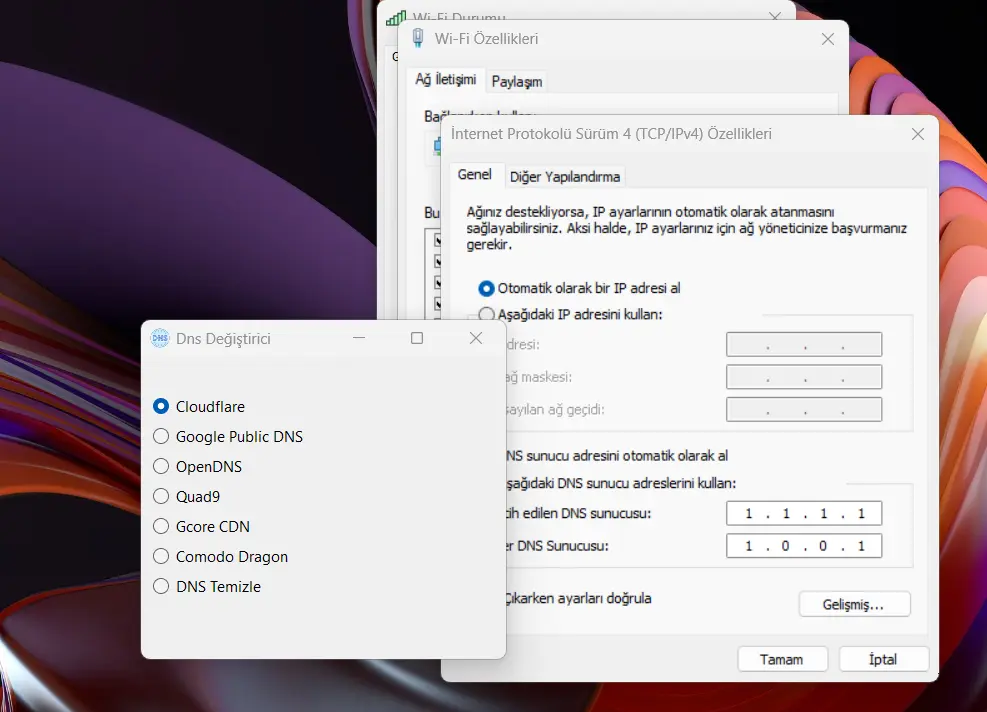
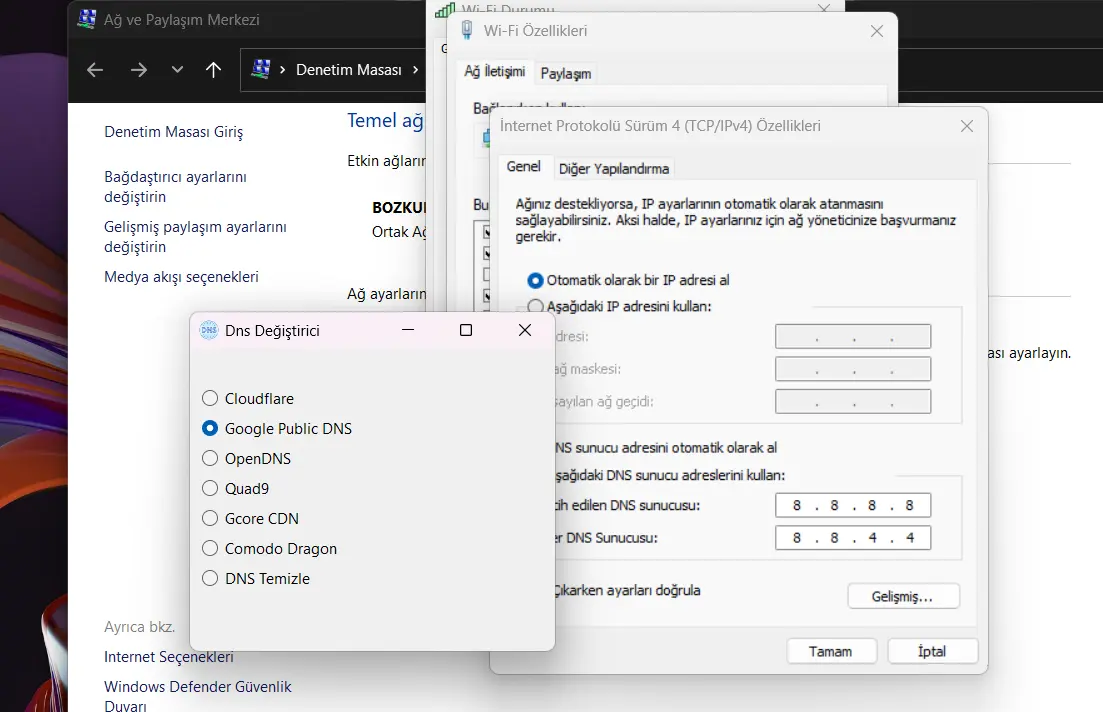
Bilgisayarınızda DNS değiştirmek istediğinizde ağ ayarlarına girip mevcut ağa tıklayıp oradan gelişmiş özelliklerden tek tek DNS yazmayın diye basit bir uygulama kodladım. Bu uygulama ile ekranda yazan yaygın 6 DNS arasında tek tık ile geçiş yapabilir ayrıca isterseniz yine tek tıklama ile DNS ayarlarınızı sıfırlayabilirsiniz.
Aslında terminal üzerinden yapılabilen komutları kullanıcı arayüzüne taşımış oldum, basit ancak yararlı olacağını düşünüyorum.
Ağ ayarları üzerinden yapacağınız değişiklikler için yönetici izni gerektiğinden uygulamanın çalışabilmesi için yönetici izni ile aç demeyi unutmayın
Uygulama bağlantısı:
dns_degistirici.exe
drive.google.com
VirusTotal:

[CODE lang="csharp" title="kolay dns değiştirici"]using System.Diagnostics;
using System.Net.NetworkInformation;
namespace dns_degistirici
{
public partial class Form1 : Form
{
public Form1()
{
InitializeComponent();
this.Load += new EventHandler(Form1_Load);
radioButton1.CheckedChanged += new EventHandler(RadioButton_CheckedChanged);
radioButton2.CheckedChanged += new EventHandler(RadioButton_CheckedChanged);
radioButton3.CheckedChanged += new EventHandler(RadioButton_CheckedChanged);
radioButton4.CheckedChanged += new EventHandler(RadioButton_CheckedChanged);
radioButton5.CheckedChanged += new EventHandler(RadioButton_CheckedChanged);
radioButton6.CheckedChanged += new EventHandler(RadioButton_CheckedChanged);
radioButton7.CheckedChanged += new EventHandler(RadioButton_CheckedChanged);
}
private void Form1_Load(object sender, EventArgs e)
{
dugme_konum(false);
}
private void dugme_konum(bool state)
{
radioButton1.CheckedChanged -= RadioButton_CheckedChanged;
radioButton2.CheckedChanged -= RadioButton_CheckedChanged;
radioButton3.CheckedChanged -= RadioButton_CheckedChanged;
radioButton4.CheckedChanged -= RadioButton_CheckedChanged;
radioButton5.CheckedChanged -= RadioButton_CheckedChanged;
radioButton6.CheckedChanged -= RadioButton_CheckedChanged;
radioButton7.CheckedChanged -= RadioButton_CheckedChanged;
radioButton1.Checked = state;
radioButton2.Checked = state;
radioButton3.Checked = state;
radioButton4.Checked = state;
radioButton5.Checked = state;
radioButton6.Checked = state;
radioButton7.Checked = state;
radioButton1.CheckedChanged += RadioButton_CheckedChanged;
radioButton2.CheckedChanged += RadioButton_CheckedChanged;
radioButton3.CheckedChanged += RadioButton_CheckedChanged;
radioButton4.CheckedChanged += RadioButton_CheckedChanged;
radioButton5.CheckedChanged += RadioButton_CheckedChanged;
radioButton6.CheckedChanged += RadioButton_CheckedChanged;
radioButton7.CheckedChanged += RadioButton_CheckedChanged;
}
private void RadioButton_CheckedChanged(object sender, EventArgs e)
{
if (radioButton1.Checked)
{
dns_degistir("1.1.1.1", "1.0.0.1");
}
else if (radioButton2.Checked)
{
dns_degistir("8.8.8.8", "8.8.4.4");
}
else if (radioButton3.Checked)
{
dns_degistir("208.67.222.222", "208.67.220.220");
}
else if (radioButton4.Checked)
{
dns_degistir("9.9.9.9", "149.112.112.11");
}
else if (radioButton5.Checked)
{
dns_degistir("95.85.95.85", "2.56.220.2");
}
else if (radioButton6.Checked)
{
dns_degistir("8.26.56.26", "8.20.247.20");
}
else if (radioButton7.Checked)
{
dns_temizle();
}
}
private string adaptor_ad()
{
NetworkInterface[] interfaces = NetworkInterface.GetAllNetworkInterfaces();
foreach (NetworkInterface ni in interfaces)
{
if (ni.OperationalStatus == OperationalStatus.Up &&
(ni.NetworkInterfaceType == NetworkInterfaceType.Ethernet || ni.NetworkInterfaceType == NetworkInterfaceType.Wireless80211))
{
return ni.Name;
}
}
return null;
}
private void dns_degistir(string primaryDns, string secondaryDns)
{
string networkInterfaceName =adaptor_ad();
if (networkInterfaceName == null)
{
MessageBox.Show("Aktif ağ bağlantısı bulunamadı.", "Hata", MessageBoxButtons.OK, MessageBoxIcon.Error);
return;
}
ProcessStartInfo psi = new ProcessStartInfo("netsh", $"interface ip set dns \"{networkInterfaceName}\" static {primaryDns}")
{
Verb = "runas",
CreateNoWindow = true,
WindowStyle = ProcessWindowStyle.Hidden
};
Process.Start(psi);
psi.Arguments = $"interface ip add dns \"{networkInterfaceName}\" {secondaryDns} index=2";
Process.Start(psi);
}
private void dns_temizle()
{
string networkInterfaceName = adaptor_ad();
if (networkInterfaceName == null)
{
MessageBox.Show("Aktif ağ bağlantısı bulunamadı.", "Hata", MessageBoxButtons.OK, MessageBoxIcon.Error);
return;
}
ProcessStartInfo psi = new ProcessStartInfo("netsh", $"interface ip set dns \"{networkInterfaceName}\" dhcp")
{
Verb = "runas",
CreateNoWindow = true,
WindowStyle = ProcessWindowStyle.Hidden
};
Process.Start(psi);
}
}
}
[/CODE]
using System.Net.NetworkInformation;
namespace dns_degistirici
{
public partial class Form1 : Form
{
public Form1()
{
InitializeComponent();
this.Load += new EventHandler(Form1_Load);
radioButton1.CheckedChanged += new EventHandler(RadioButton_CheckedChanged);
radioButton2.CheckedChanged += new EventHandler(RadioButton_CheckedChanged);
radioButton3.CheckedChanged += new EventHandler(RadioButton_CheckedChanged);
radioButton4.CheckedChanged += new EventHandler(RadioButton_CheckedChanged);
radioButton5.CheckedChanged += new EventHandler(RadioButton_CheckedChanged);
radioButton6.CheckedChanged += new EventHandler(RadioButton_CheckedChanged);
radioButton7.CheckedChanged += new EventHandler(RadioButton_CheckedChanged);
}
private void Form1_Load(object sender, EventArgs e)
{
dugme_konum(false);
}
private void dugme_konum(bool state)
{
radioButton1.CheckedChanged -= RadioButton_CheckedChanged;
radioButton2.CheckedChanged -= RadioButton_CheckedChanged;
radioButton3.CheckedChanged -= RadioButton_CheckedChanged;
radioButton4.CheckedChanged -= RadioButton_CheckedChanged;
radioButton5.CheckedChanged -= RadioButton_CheckedChanged;
radioButton6.CheckedChanged -= RadioButton_CheckedChanged;
radioButton7.CheckedChanged -= RadioButton_CheckedChanged;
radioButton1.Checked = state;
radioButton2.Checked = state;
radioButton3.Checked = state;
radioButton4.Checked = state;
radioButton5.Checked = state;
radioButton6.Checked = state;
radioButton7.Checked = state;
radioButton1.CheckedChanged += RadioButton_CheckedChanged;
radioButton2.CheckedChanged += RadioButton_CheckedChanged;
radioButton3.CheckedChanged += RadioButton_CheckedChanged;
radioButton4.CheckedChanged += RadioButton_CheckedChanged;
radioButton5.CheckedChanged += RadioButton_CheckedChanged;
radioButton6.CheckedChanged += RadioButton_CheckedChanged;
radioButton7.CheckedChanged += RadioButton_CheckedChanged;
}
private void RadioButton_CheckedChanged(object sender, EventArgs e)
{
if (radioButton1.Checked)
{
dns_degistir("1.1.1.1", "1.0.0.1");
}
else if (radioButton2.Checked)
{
dns_degistir("8.8.8.8", "8.8.4.4");
}
else if (radioButton3.Checked)
{
dns_degistir("208.67.222.222", "208.67.220.220");
}
else if (radioButton4.Checked)
{
dns_degistir("9.9.9.9", "149.112.112.11");
}
else if (radioButton5.Checked)
{
dns_degistir("95.85.95.85", "2.56.220.2");
}
else if (radioButton6.Checked)
{
dns_degistir("8.26.56.26", "8.20.247.20");
}
else if (radioButton7.Checked)
{
dns_temizle();
}
}
private string adaptor_ad()
{
NetworkInterface[] interfaces = NetworkInterface.GetAllNetworkInterfaces();
foreach (NetworkInterface ni in interfaces)
{
if (ni.OperationalStatus == OperationalStatus.Up &&
(ni.NetworkInterfaceType == NetworkInterfaceType.Ethernet || ni.NetworkInterfaceType == NetworkInterfaceType.Wireless80211))
{
return ni.Name;
}
}
return null;
}
private void dns_degistir(string primaryDns, string secondaryDns)
{
string networkInterfaceName =adaptor_ad();
if (networkInterfaceName == null)
{
MessageBox.Show("Aktif ağ bağlantısı bulunamadı.", "Hata", MessageBoxButtons.OK, MessageBoxIcon.Error);
return;
}
ProcessStartInfo psi = new ProcessStartInfo("netsh", $"interface ip set dns \"{networkInterfaceName}\" static {primaryDns}")
{
Verb = "runas",
CreateNoWindow = true,
WindowStyle = ProcessWindowStyle.Hidden
};
Process.Start(psi);
psi.Arguments = $"interface ip add dns \"{networkInterfaceName}\" {secondaryDns} index=2";
Process.Start(psi);
}
private void dns_temizle()
{
string networkInterfaceName = adaptor_ad();
if (networkInterfaceName == null)
{
MessageBox.Show("Aktif ağ bağlantısı bulunamadı.", "Hata", MessageBoxButtons.OK, MessageBoxIcon.Error);
return;
}
ProcessStartInfo psi = new ProcessStartInfo("netsh", $"interface ip set dns \"{networkInterfaceName}\" dhcp")
{
Verb = "runas",
CreateNoWindow = true,
WindowStyle = ProcessWindowStyle.Hidden
};
Process.Start(psi);
}
}
}
[/CODE]


