RoaringLion
Üstün

Merhaba,
Mac'e alışma sürecim tüm hızıyla devam ediyor. Windows'ta, görev çubuğuna sabitlediğim programlara sağ tıklayarak o programla açtığım dosyaların listesine ulaşabiliyordum. O listede değişiklik yapabiliyor, istediklerimi sabitleyip istemediklerimi temizleyebiliyordum. Sabitleme sırasına göre istediğim öğeleri üstte veya altta konumlanacak şekilde ayarlayabiliyordum. macOS'ta da böyle bir liste var ama kendim düzenlemeyi beceremedim. İstemediğim dosyaları o listeden silip istediklerimi sabitleme ve sıralama olanağım var mı?
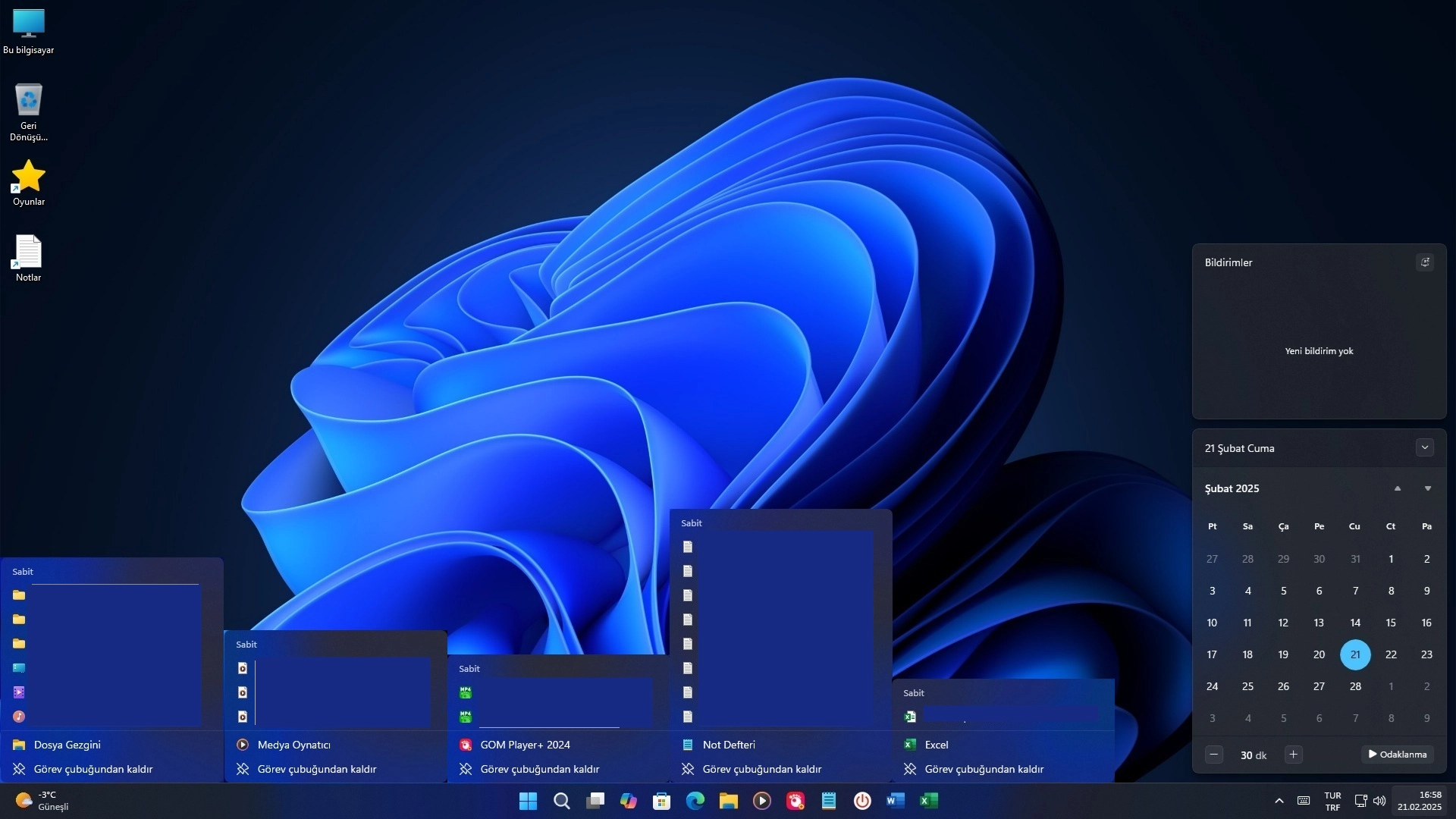
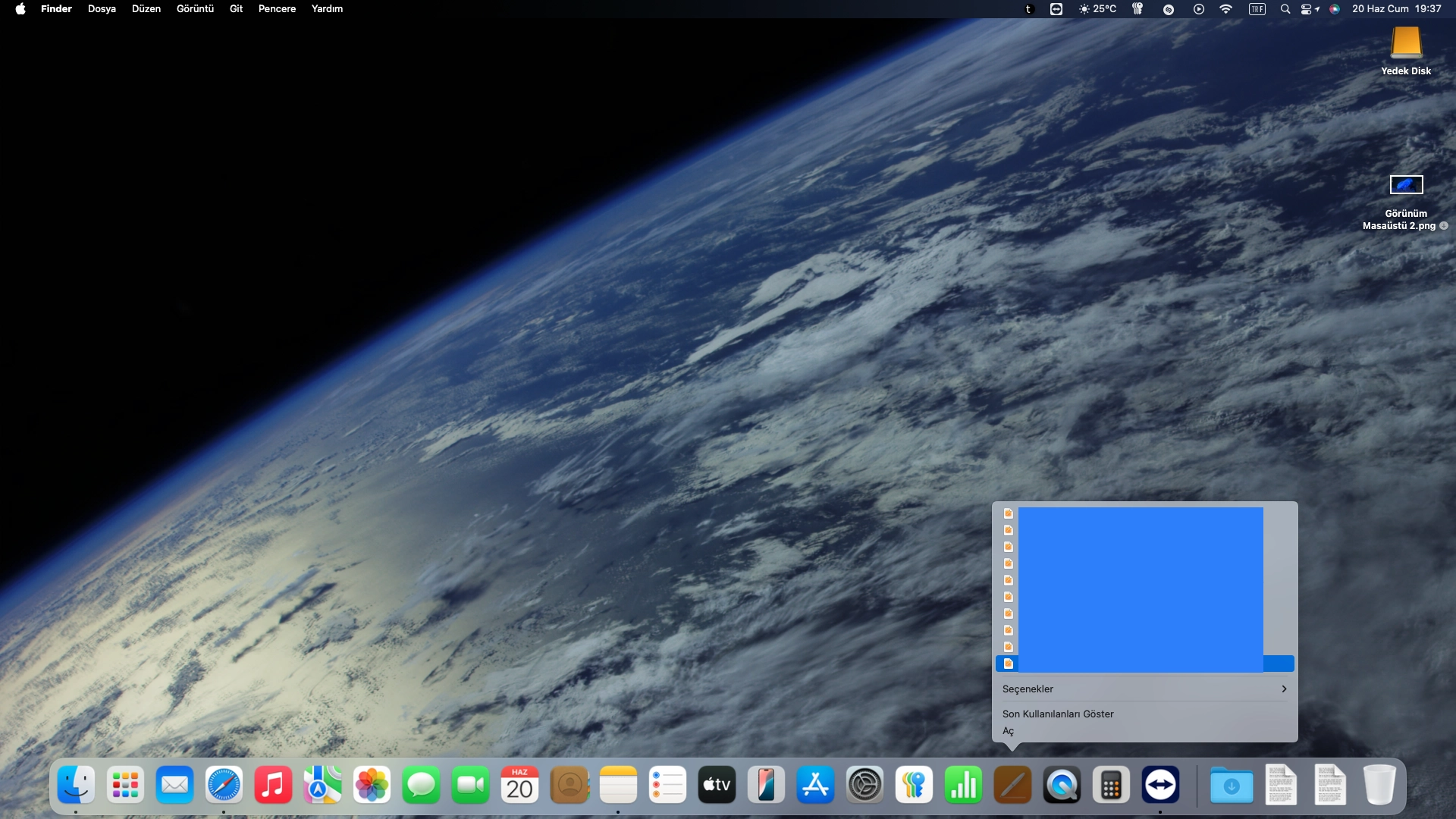
Sanırım macOS'ta böyle bir özellik yok. Pages ve macOS geri bildirim sayfalarından özellik talebi başlıklı bir geri bildirim gönderdim. İsteyen göndersin, daha hızlı gerçekleşebilir, belki Tahoe'yla birlikte bile gelebilir. Umarım bu özellik en kısa sürede gelir. Windows'ta yıllardır olan bir özellik macOS'ta nasıl olmaz, insanlar sürekli kullandıkları dosyaları iki fare tıklatması ile ulaşamadan Mac'i kullanmaktan nasıl keyif alıyorlar anlayamıyorum.
Pages for macOS Geri Bildirimi:
Hello,
I can see recent folders in Finder and recent files in Numbers and Pages by right-clicking on their icons in the dock. These recent items need to be edited. For example, some need to be pinned, all need to be realigned, and some need to be removed. If there was a feature that allowed me to do these things, it would be easier to work with, save time, and I would enjoy using MacOS a lot more.
For example, when I right-click on the Pages icon in the dock, I can see the recent files. I should be able to right-click on these recent files and use commands that allow me to do these actions, pin them, drag them up and down, and remove each one individually, instead of opening them like I would when I left-click.
Best regards.
macOS Geri Bildirimi 1:
Hello,
I can see recent folders in Finder and recent files in Numbers and Pages by right-clicking on their icons in the dock. These recent items need to be edited. For example, some need to be pinned, all need to be realigned, and some need to be removed. If there was a feature that allowed me to do these things, it would be easier to work with, save time, and I would enjoy using MacOS a lot more.
For example, when I right-click on the Finder icon in the dock, I can see the recent folders. I should be able to right-click on these recent folders and use commands that allow me to do these actions, pin them, drag them up and down, and remove each one individually, instead of opening them like I would when I left-click.
Best regards.
macOS Geri Bildirimi 2:
Hello,
I use Logitech G300S and Steelseries Rival 600 as mouse. When I scroll up or down a page with both of my mouse, it suddenly jumps to the next scroll, not smooth, not fluent. I don't know if this happens with an Apple Magic Mouse, but with my other branded mouse, I have to scroll up and down smoothly.
Best regards.
Mac'e alışma sürecim tüm hızıyla devam ediyor. Windows'ta, görev çubuğuna sabitlediğim programlara sağ tıklayarak o programla açtığım dosyaların listesine ulaşabiliyordum. O listede değişiklik yapabiliyor, istediklerimi sabitleyip istemediklerimi temizleyebiliyordum. Sabitleme sırasına göre istediğim öğeleri üstte veya altta konumlanacak şekilde ayarlayabiliyordum. macOS'ta da böyle bir liste var ama kendim düzenlemeyi beceremedim. İstemediğim dosyaları o listeden silip istediklerimi sabitleme ve sıralama olanağım var mı?
Sanırım macOS'ta böyle bir özellik yok. Pages ve macOS geri bildirim sayfalarından özellik talebi başlıklı bir geri bildirim gönderdim. İsteyen göndersin, daha hızlı gerçekleşebilir, belki Tahoe'yla birlikte bile gelebilir. Umarım bu özellik en kısa sürede gelir. Windows'ta yıllardır olan bir özellik macOS'ta nasıl olmaz, insanlar sürekli kullandıkları dosyaları iki fare tıklatması ile ulaşamadan Mac'i kullanmaktan nasıl keyif alıyorlar anlayamıyorum.
Pages for macOS Geri Bildirimi:
Hello,
I can see recent folders in Finder and recent files in Numbers and Pages by right-clicking on their icons in the dock. These recent items need to be edited. For example, some need to be pinned, all need to be realigned, and some need to be removed. If there was a feature that allowed me to do these things, it would be easier to work with, save time, and I would enjoy using MacOS a lot more.
For example, when I right-click on the Pages icon in the dock, I can see the recent files. I should be able to right-click on these recent files and use commands that allow me to do these actions, pin them, drag them up and down, and remove each one individually, instead of opening them like I would when I left-click.
Best regards.
macOS Geri Bildirimi 1:
Hello,
I can see recent folders in Finder and recent files in Numbers and Pages by right-clicking on their icons in the dock. These recent items need to be edited. For example, some need to be pinned, all need to be realigned, and some need to be removed. If there was a feature that allowed me to do these things, it would be easier to work with, save time, and I would enjoy using MacOS a lot more.
For example, when I right-click on the Finder icon in the dock, I can see the recent folders. I should be able to right-click on these recent folders and use commands that allow me to do these actions, pin them, drag them up and down, and remove each one individually, instead of opening them like I would when I left-click.
Best regards.
macOS Geri Bildirimi 2:
Hello,
I use Logitech G300S and Steelseries Rival 600 as mouse. When I scroll up or down a page with both of my mouse, it suddenly jumps to the next scroll, not smooth, not fluent. I don't know if this happens with an Apple Magic Mouse, but with my other branded mouse, I have to scroll up and down smoothly.
Best regards.
Son düzenleyen: Moderatör: