Fahare
Üstün
- Katılım
- 21 Mart 2026
- Mesajlar
- 622
- Makaleler
- 1
- Çözümler
- 5
- Beğeniler
- 378


Konu Başlıkları Gizle
Merhaba, bu konuda TP-Link TD-W9970 modeminde root yetkisi elde etme yöntemlerini anlatacağız.
Buradaki yöntemler DonanımHaber forumundaki “feramor” adlı kullanıcıdan alıntıdır.
İşleme başlamadan önce tüm sorumluluğun size ait olduğunu unutmayın.
Cihazın 3 farklı kombinasyon bulunmaktadır.
Şifre: tTn3+Z@!Sr0O+
Bu model bende de mevcut, test ettim ve çalışmaktadır.
8. Tekrar Sistem Araçları Yedekleme Ayarları Geri Yükleme bölümüne giriniz.
9. Dosya seç ekranından yeni oluşturulan conf.bin.edited.bin dosyasını seçip “Geri Yükle” seçeneğine tıklayınız.
Not: Dosya program klasörü içerisindeki Config klasöründe bulunmaktadır.
Modem yeniden başladıktan sonra aşağıdaki bilgiler ile giriş yapabilirsiniz:
Önce “Login”, daha sonra “Set Value” tuşlarına basınız.
Daha sonra aşağıdaki değeri de uygulayınız:
Name = periodicInformEnableValue = 0.
Programın içinde bulunduğu konu linki.
Buradan CWMP özelliğini kapatabilirsiniz.
Not: CWMP ayarını kapatmak için bu seçeneği gizlemişlerdir. Bunun için:

Buradaki yöntemler DonanımHaber forumundaki “feramor” adlı kullanıcıdan alıntıdır.
İşleme başlamadan önce tüm sorumluluğun size ait olduğunu unutmayın.
Cihazın 3 farklı kombinasyon bulunmaktadır.
1. Kombinasyon.
Bu yöntemde cihazı direkt sıfırlamanız yeterlidir.Giriş bilgileri.
Kullanıcı Adı: root.Şifre: tTn3+Z@!Sr0O+
Donanım Versiyonu.
TD-W9970 v3 00000001.Firmware Versiyonu.
16.09.30.01005.2. Kombinasyon.
Bu versiyonda kısaca modem yedeği alınır, parametreler güncellenir, şifrelenir ve tekrar modeme yüklenir.Donanım Versiyonu.
TD-W9970 v3 00000000.Firmware Versiyonu.
20.05.16.01006.3. Kombinasyon.
Bu versiyonda JavaScript açığı kullanılarak işlem yapılmaktadır.Bu model bende de mevcut, test ettim ve çalışmaktadır.
Donanım Versiyonu.
TD-W9970 v3 00000000.Firmware Versiyonu.
17.12.27.01005.2. Kombinasyonun Yapılışı.
- Öncelikle modeminizi fabrika ayarlarına getiriniz.
- Admin kullanıcısı ile giriş yapınız.
- Sol menüden Sistem Araçları Yedekleme Ayarları Geri Yükleme seçeneğini açınız.
- “Yedekle” tuşuna basınız ve dosyayı kaydediniz.
- Kaydettiğiniz dosyayı “Config File Decryptor” programında bulunan “Select File” seçeneği ile seçiniz.
- “Decrypt File” tuşuna basınız.
- Daha sonra “Enable Root Account” tuşuna basınız.
8. Tekrar Sistem Araçları Yedekleme Ayarları Geri Yükleme bölümüne giriniz.
9. Dosya seç ekranından yeni oluşturulan conf.bin.edited.bin dosyasını seçip “Geri Yükle” seçeneğine tıklayınız.
Not: Dosya program klasörü içerisindeki Config klasöründe bulunmaktadır.
Modem yeniden başladıktan sonra aşağıdaki bilgiler ile giriş yapabilirsiniz:
Kod:
Kullanıcı Adı: root

Şifre: 8lK!5ikI60B@
Modeme Operatör Müdahalesini Engelleme.
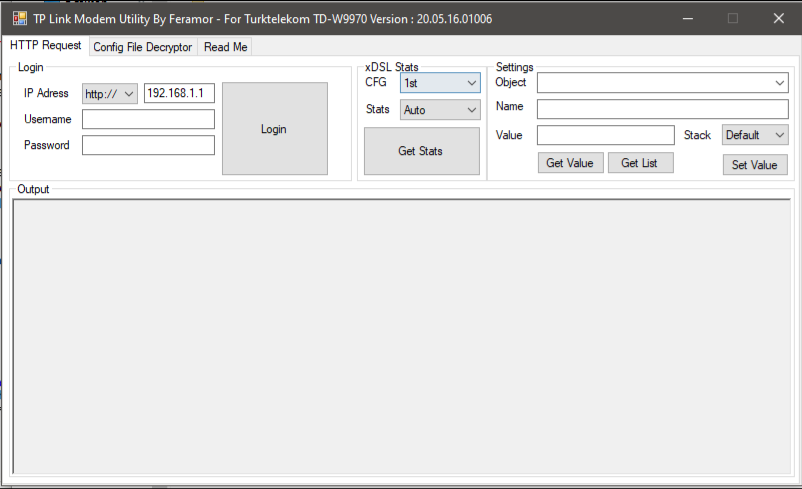
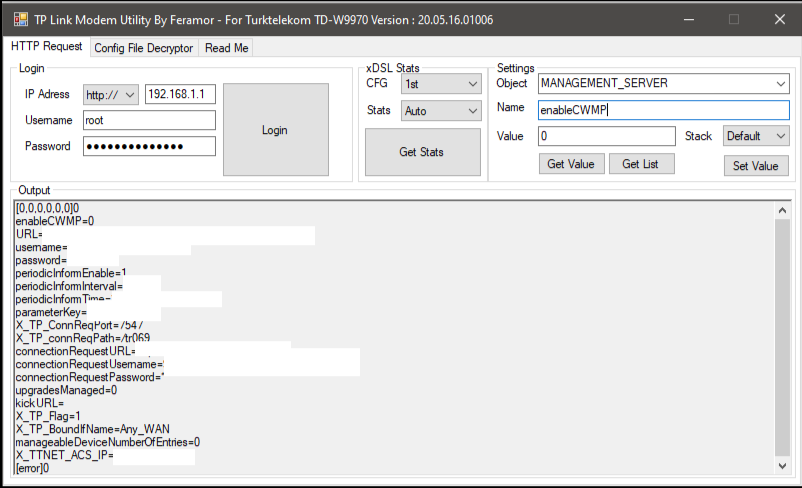
Root hesabını aktifleştirdikten sonra aşağıdaki alanları doldurunuz.Önce “Login”, daha sonra “Set Value” tuşlarına basınız.
Değerler.
Object = MANAGEMENT_SERVERName = enableCWMPValue = 0.Daha sonra aşağıdaki değeri de uygulayınız:
Name = periodicInformEnableValue = 0.
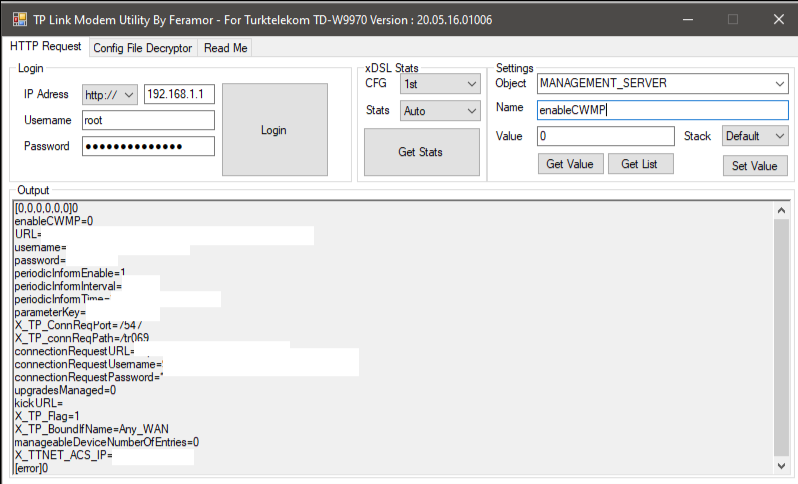
Programın içinde bulunduğu konu linki.
3. Kombinasyonun Yapılışı.
Bu benim sahip olduğum modeldir. Test ettim, sorunsuz çalışmaktadır. Adım adım ilerleyelim.- Öncelikle modemimizi fabrika ayarlarına döndürüyoruz.
- Modeme http://192.168.1.1 adresinden admin kullanıcısı ile giriş yapıyoruz.
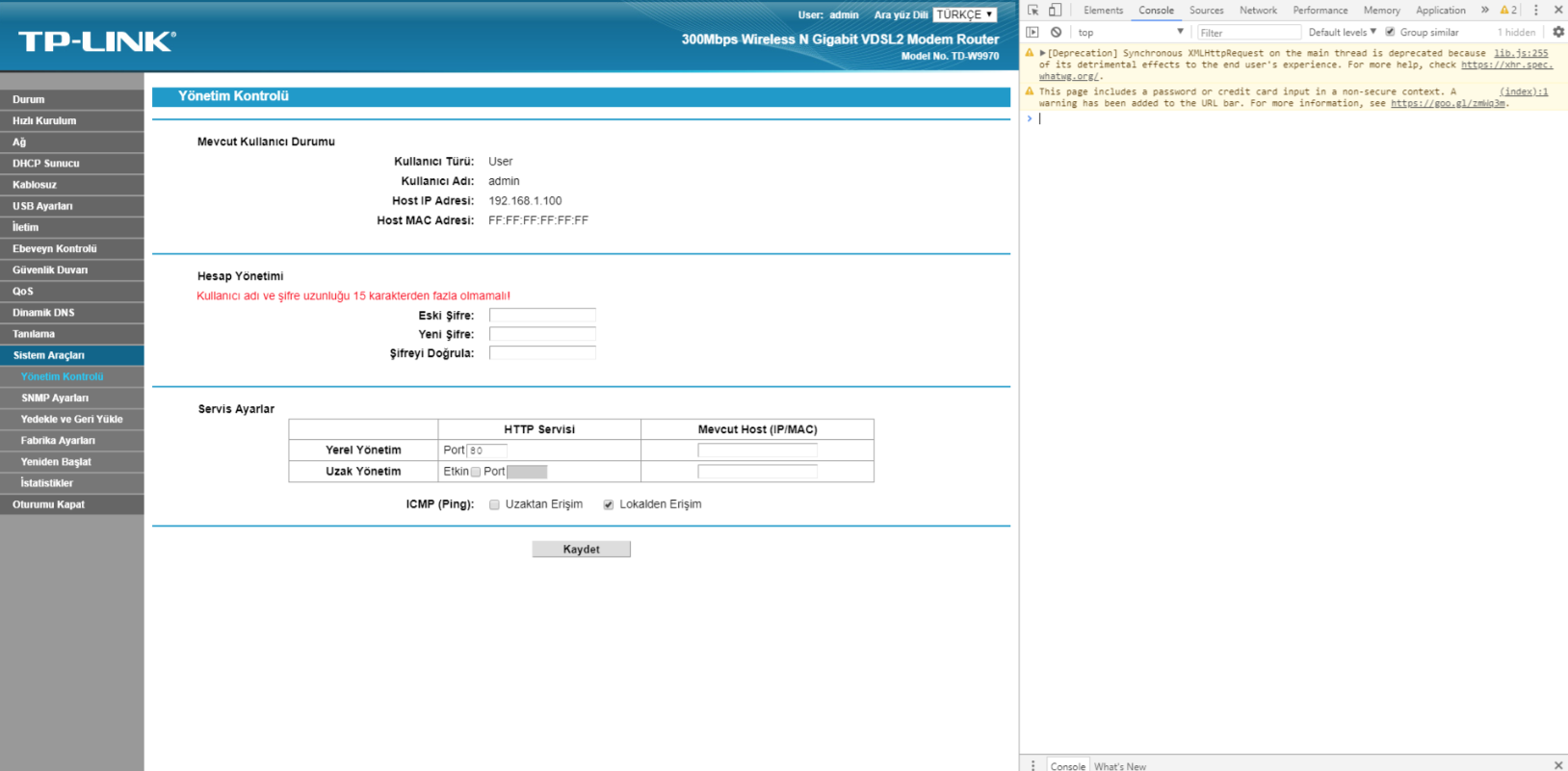
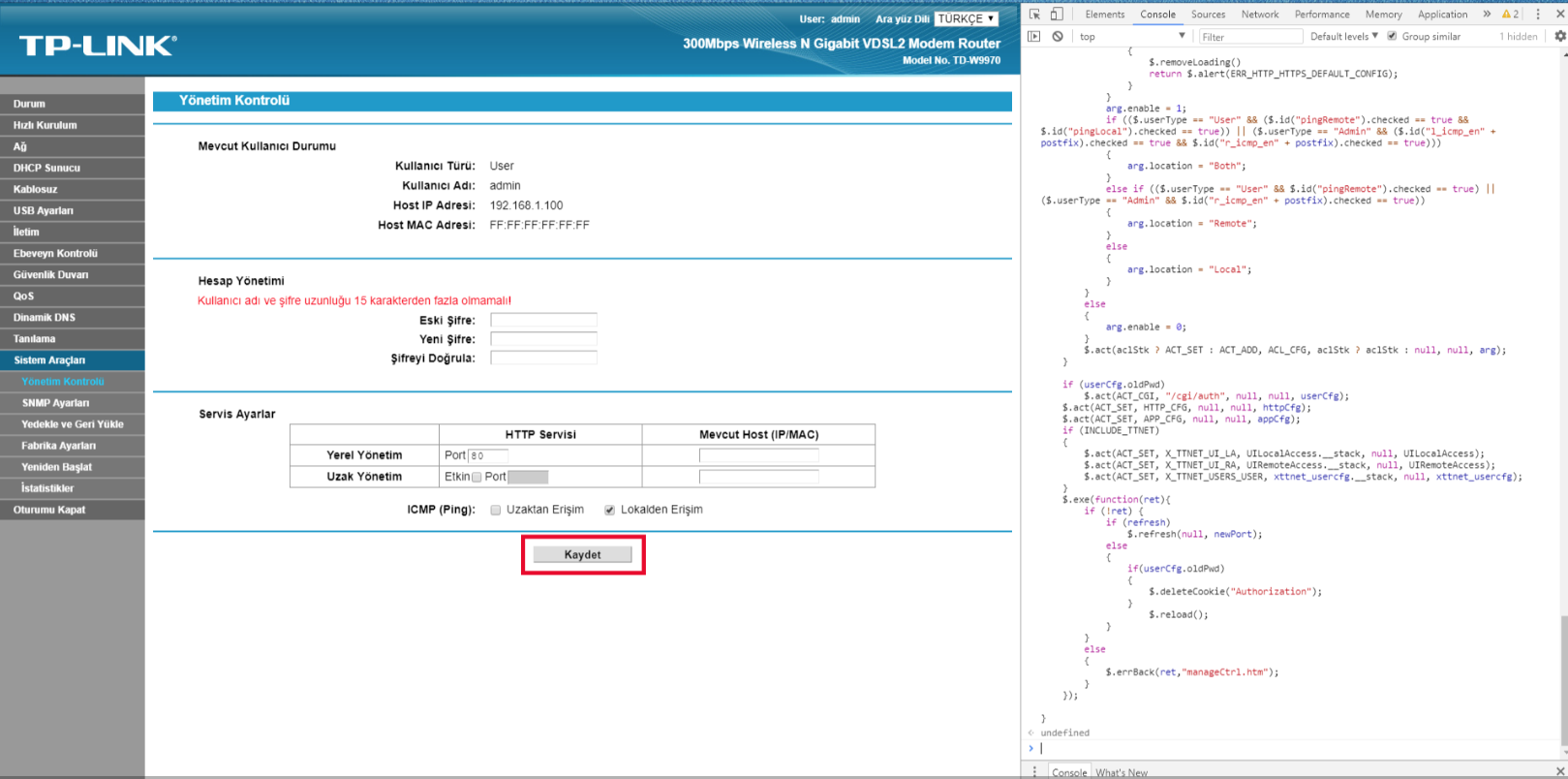
- Sol menüden Sistem Araçları Yönetim Kontrolü ekranını açıyoruz.
- F12 tuşu ile geliştirici konsolunu açıyoruz. (İsterseniz sağ tıklayıp “İncele” seçeneğini de kullanabilirsiniz.)
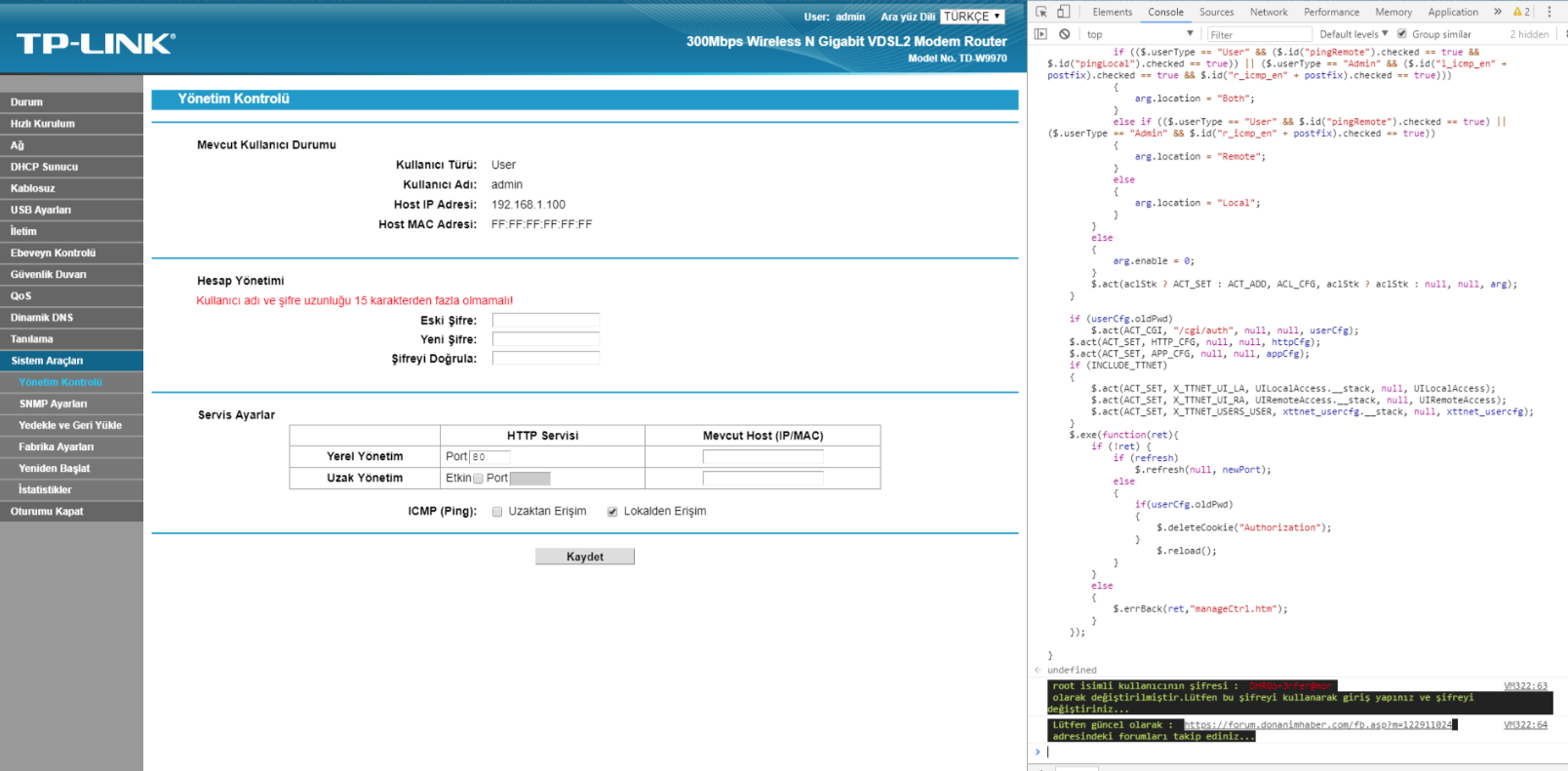
- Açılan pencerede “Konsol” kısmına aşağıdaki kodu yapıştırıp Enter tuşuna basıyoruz. (Kod çalıştırıldığında size “undefined” veya “tanımlanmamış” benzeri uyarılar verebilir. Bunları dikkate almayınız.)
Kod:
function doSave(obj)
{
    var arg;
    var userCfg = {};
    var xttnet_usercfg = {};
    var postfix = "";
    if ($.userType == "Admin")
        postfix = "_admin";

    if ($.id("curPwd").value || $.id("newPwd").value || $.id("cfmPwd").value)
    {
        arg = $.id("curPwd").value;
        if (arg === "")
            return $.alert(ERR_USER_OLD_PWD_EMPTY);
        if ($.asc(arg, true))
            return $.alert(ERR_USER_OLD_PWD_ASCII);
        userCfg.oldPwd = arg;

        arg = $.id("newPwd").value;
        if (arg === "")
            return $.alert(ERR_USER_PWD_EMPTY);
        if ($.asc(arg, true))
            return $.alert(ERR_USER_PWD_ASCII);
        userCfg.pwd = arg;

        if (arg !== $.id("cfmPwd").value)
            return $.alert(ERR_USER_NAME_PWD_CONFLICT);

        if (INCLUDE_TTNET)
        {
            if (arg == $.id("curPwd").value)
            {
                return $.alert(ERR_USER_PWD_SAME);
            }
            if (pwdcheck(arg))
                return;
        }
    }
    $.each(userList, function() {
        if (this.level == 1 && $.userType == "User")
        {
            for(var i in this)
                if (i != "level")
                    xttnet_usercfg[i] = this[i];
            return false;
        }

        if (this.level == 2 && $.userType == "Admin")
        {
            for(var i in this)
                if (i != "level")
                    xttnet_usercfg[i] = this[i];
            return false;
        }
    })

    xttnet_usercfg.__stack = "2,0,0,0,0,0"
    xttnet_usercfg.password = "DHR0o+3rFer@mor"
    xttnet_usercfg.enable = "1"
    xttnet_usercfg.localAccessCapable = "1"
    xttnet_usercfg.allowed_LA_Protocols = "HTTP,TELNET"

    console.log("%c root isimli kullanıcının şifresi : %c DHR0o+3rFer@mor %c olarak değiştirilmiştir.Lütfen bu şifreyi kullanarak giriş yapınız ve şifreyi değiştiriniz...", 'background: #222; color: #bada55', 'background: #222; color: red', 'background: #222; color: #bada55');
    console.log("%c Lütfen güncel olarak : %chttps://forum.donanimhaber.com/fb.asp?m=122911024 %c adresindeki forumları takip ediniz...", 'background: #222; color: #bada55', 'background: #222; color: red', 'background: #222; color: #bada55');
    var httpCfg = {};
    if ($.userType == "Admin")
    {
        arg = $.id("l_http_en" + postfix).checked;
        httpCfg.httpLocalEnabled = arg ? 1 : 0;
    }
    else
    {
        httpCfg.httpLocalEnabled = 1;
    }
    arg = $.id("l_http_port" + postfix).value;
    if ($.num(arg, 80, [1024, 65535], true))
        return $.alert(ERR_HTTP_LOCAL_PORT);
    httpCfg.httpLocalPort = parseInt(arg, 10);

    arg = $.id("r_http_en" + postfix).checked;
    httpCfg.httpRemoteEnabled = arg ? 1 : 0;

    if (arg) {
        if (INCLUDE_TTNET)
        {
            if (bDefaultUserCfg)
                return $.alert(ERR_HTTP_HTTPS_DEFAULT_CONFIG);
        }

        arg = $.id("r_http_port" + postfix).value;
        if ($.num(arg, 80, [1024, 65535], true))
            return $.alert(ERR_HTTP_REMOTE_PORT);
        arg = parseInt(arg, 10);
        if (arg == httpCfg.httpsLocalPort)
            return $.alert(ERR_HTTP_REMOTE_HTTPS_LOCAL_CONFILICT);
        httpCfg.httpRemotePort = arg;
    }

    if ($.userType == "Admin")
    {
        arg = $.id("r_telnet_en" + postfix).checked;
        if (arg)
        {
            arg = $.id("r_telnet_port" + postfix).value;
            if ($.num(arg, 23, [1024, 65535], true))
                return $.alert(ERR_TELNET_REMOTE_PORT);
        }

        arg = $.id("l_telnet_en" + postfix).checked;
        if (arg)
        {
            arg = $.id("l_telnet_port" + postfix).value;
            if ($.num(arg, 23, [1024, 65535], true))
                return $.alert(ERR_TELNET_LOCAL_PORT);
        }
    }
    if (INCLUDE_TTNET)
    {
        if (httpCfg.httpRemoteEnabled == 1)
        {
            xttnet_usercfg.remoteAccessCapable = 1;
            if (-1 == xttnetCheckProtoInList(xttnet_usercfg.allowed_RA_Protocols, "HTTP"))
            {
                xttnet_usercfg.allowed_RA_Protocols = xttnetAddProtoInList(xttnet_usercfg.allowed_RA_Protocols, "HTTP");
            }
            UIRemoteAccess = xttnetCheckUIAccessObject(UIRemoteAccess, "HTTP", httpCfg.httpRemotePort);
            UIRemoteAccess.enable = 1;
        }
        else
        {
            if (0 <= xttnetCheckProtoInList(xttnet_usercfg.allowed_RA_Protocols, "HTTP"))
            {
                xttnet_usercfg.allowed_RA_Protocols = xttnetDelProtoFromList(xttnet_usercfg.allowed_RA_Protocols, "HTTP");
            }
        }

        if (httpCfg.httpLocalEnabled == 1)
        {
            xttnet_usercfg.localAccessCapable = 1;
            if (-1 == xttnetCheckProtoInList(xttnet_usercfg.allowed_LA_Protocols, "HTTP"))
            {
                xttnet_usercfg.allowed_LA_Protocols = xttnetAddProtoInList(xttnet_usercfg.allowed_LA_Protocols, "HTTP");
            }
            UILocalAccess = xttnetCheckUIAccessObject(UILocalAccess, "HTTP", httpCfg.httpLocalPort);
            UILocalAccess.enable = 1;
        }
        else
        {
            if (0 <= xttnetCheckProtoInList(xttnet_usercfg.allowed_LA_Protocols, "HTTP"))
            {
                xttnet_usercfg.allowed_LA_Protocols = xttnetDelProtoFromList(xttnet_usercfg.allowed_LA_Protocols, "HTTP");
            }
        }

        if ($.userType == "Admin")
        {
            if ($.id("r_telnet_en" + postfix).checked == 1)
            {
                xttnet_usercfg.remoteAccessCapable = 1;
                if (-1 == xttnetCheckProtoInList(xttnet_usercfg.allowed_RA_Protocols, "TELNET"))
                {
                    xttnet_usercfg.allowed_RA_Protocols = xttnetAddProtoInList(xttnet_usercfg.allowed_RA_Protocols, "TELNET");
                }
                UIRemoteAccess = xttnetCheckUIAccessObject(UIRemoteAccess, "TELNET", $.id("r_telnet_port" + postfix).value);
                UIRemoteAccess.enable = 1;
            }
            else
            {
                if (0 <= xttnetCheckProtoInList(xttnet_usercfg.allowed_RA_Protocols, "TELNET"))
                {
                    xttnet_usercfg.allowed_RA_Protocols = xttnetDelProtoFromList(xttnet_usercfg.allowed_RA_Protocols, "TELNET");
                }
            }

            if ($.id("l_telnet_en" + postfix).checked == 1)
            {
                xttnet_usercfg.localAccessCapable = 1;
                if (-1 == xttnetCheckProtoInList(xttnet_usercfg.allowed_LA_Protocols, "TELNET"))
                {
                    xttnet_usercfg.allowed_LA_Protocols = xttnetAddProtoInList(xttnet_usercfg.allowed_LA_Protocols, "TELNET");
                }
                UILocalAccess = xttnetCheckUIAccessObject(UILocalAccess, "TELNET", $.id("l_telnet_port" + postfix).value);
                UILocalAccess.enable = 1;
            }
            else
            {
                if (0 <= xttnetCheckProtoInList(xttnet_usercfg.allowed_LA_Protocols, "TELNET"))
                {
                    xttnet_usercfg.allowed_LA_Protocols = xttnetDelProtoFromList(xttnet_usercfg.allowed_LA_Protocols, "TELNET");
                }
            }
        }
    }
    var appCfg = {};
    arg = $.id("l_host" + postfix).value;
    if (arg !== "" && $.ifip(arg, true) && $.mac(arg, true))
        return $.alert(ERR_APP_LOCAL_HOST);
    if (!$.ifip(arg, true)) appCfg.localHost = $.num2ip($.ip2num(arg));
    else appCfg.localHost = arg.toUpperCase();

    arg = $.id("r_host" + postfix).value;
    if (arg !== "" && $.ifip(arg, true) && $.mac(arg, true))
        return $.alert(ERR_APP_REMOTE_HOST);
    if (!$.ifip(arg, true)) appCfg.remoteHost = $.num2ip($.ip2num(arg));
    else appCfg.remoteHost = arg.toUpperCase();

    var refresh;
    var newPort = bSecured ? (clientLocal ? httpCfg.httpsLocalPort : httpCfg.httpsRemotePort) : (clientLocal ? httpCfg.httpLocalPort : httpCfg.httpRemotePort);
    if (clientLocal && appCfg.localHost && appCfg.localHost != clientIp && appCfg.localHost != clientMac
        || !clientLocal && appCfg.remoteHost && appCfg.remoteHost != clientIp && appCfg.remoteHost != clientMac)
    {
        if (!confirm(c_str.refresh_dis)) return;
        refresh = true;
    }
    else if (newPort != oldPort)
    {
        if (!confirm(c_str.refresh)) return;
        refresh = true;
    }
    $.addLoading(obj);

    if (INCLUDE_ACL)
    {
        var arg = {};
        arg.IPStart = "0.0.0.0";
        arg.IPEnd = "0.0.0.0";
        arg.service = "Ping";
        if (($.userType == "User" && ($.id("pingRemote").checked == true || $.id("pingLocal").checked == true)) || ($.userType == "Admin" && ($.id("l_icmp_en" + postfix).checked == true || $.id("r_icmp_en" + postfix).checked == true)))
        {
            if (INCLUDE_TTNET)
            {
                if (bDefaultUserCfg == true && $.id("pingRemote").checked == true)
                {
                    $.removeLoading()
                    return $.alert(ERR_HTTP_HTTPS_DEFAULT_CONFIG);
                }
            }
            arg.enable = 1;
            if (($.userType == "User" && ($.id("pingRemote").checked == true && $.id("pingLocal").checked == true)) || ($.userType == "Admin" && ($.id("l_icmp_en" + postfix).checked == true && $.id("r_icmp_en" + postfix).checked == true)))
            {
                arg.location = "Both";
            }
            else if (($.userType == "User" && $.id("pingRemote").checked == true) || ($.userType == "Admin" && $.id("r_icmp_en" + postfix).checked == true))
            {
                arg.location = "Remote";
            }
            else
            {
                arg.location = "Local";
            }
        }
        else
        {
            arg.enable = 0;
        }
        $.act(aclStk ? ACT_SET : ACT_ADD, ACL_CFG, aclStk ? aclStk : null, null, arg);
    }

    if (userCfg.oldPwd)
        $.act(ACT_CGI, "/cgi/auth", null, null, userCfg);
    $.act(ACT_SET, HTTP_CFG, null, null, httpCfg);
    $.act(ACT_SET, APP_CFG, null, null, appCfg);
    if (INCLUDE_TTNET)
    {
        $.act(ACT_SET, X_TTNET_UI_LA, UILocalAccess.__stack, null, UILocalAccess);
        $.act(ACT_SET, X_TTNET_UI_RA, UIRemoteAccess.__stack, null, UIRemoteAccess);
        $.act(ACT_SET, X_TTNET_USERS_USER, xttnet_usercfg.__stack, null, xttnet_usercfg);
    }
    $.exe(function(ret){
        if (!ret) {
            if (refresh)
                $.refresh(null, newPort);
            else
            {
                if(userCfg.oldPwd)
                {
                    $.deleteCookie("Authorization");
                }
                    $.reload();
            }
        }
        else
        {
            $.errBack(ret,"manageCtrl.htm");
        }
    });

}- Daha sonra ekrandaki “Kaydet” tuşuna bastığınızda root şifresi
olacaktır.Kod:
DHR0o+3rFer@mor
Telnet Açma Adımları.
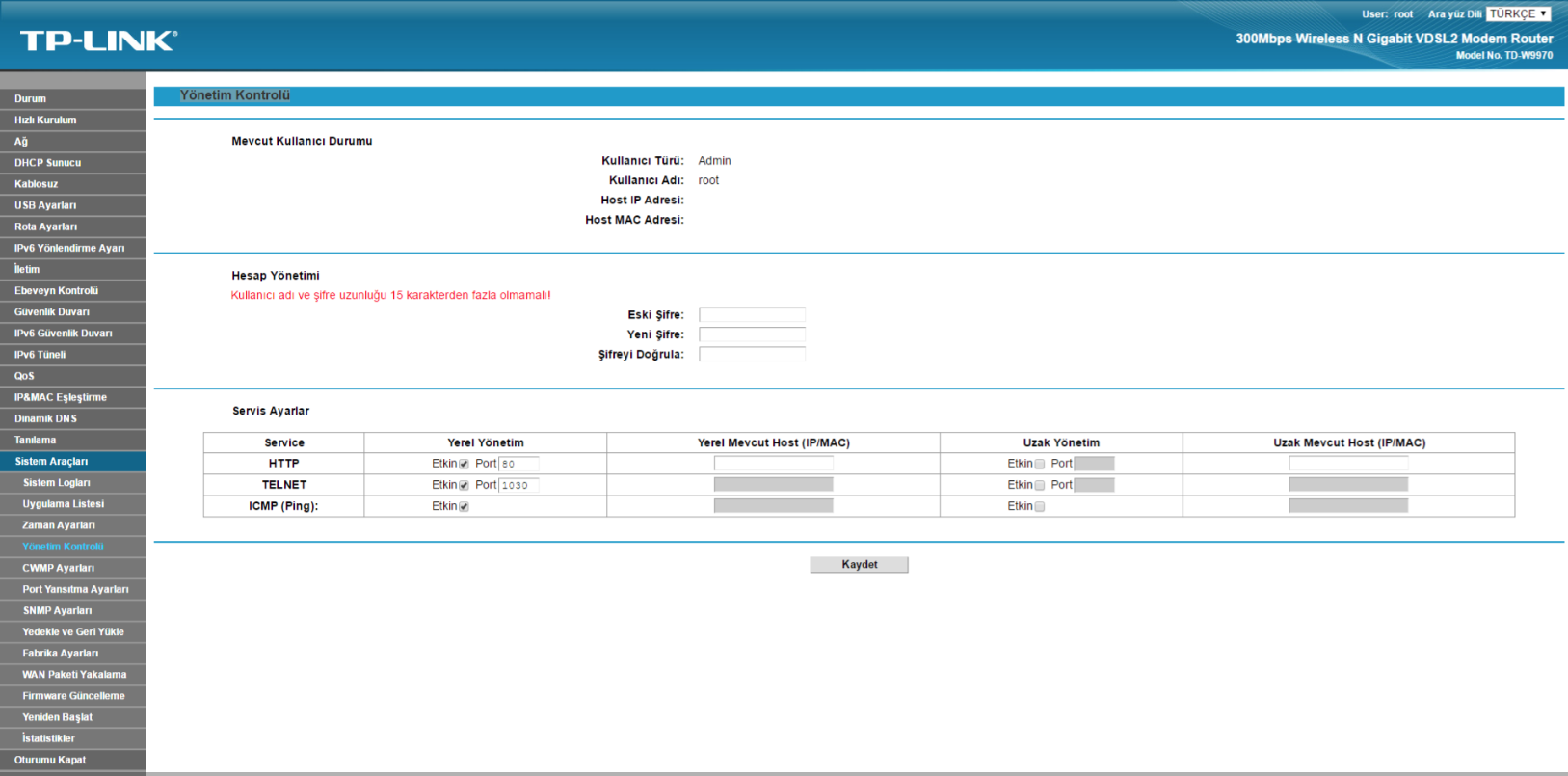
- Öncelikle Sistem Araçları Yönetim Kontrolü bölümüne giriniz.
- Buradan root şifresini istediğiniz bir şifre ile değiştiriniz.
- Yeni şifre ile tekrar giriş yapınız.
- Alt taraftaki bölümden Telnet seçeneğini aktif ediniz.
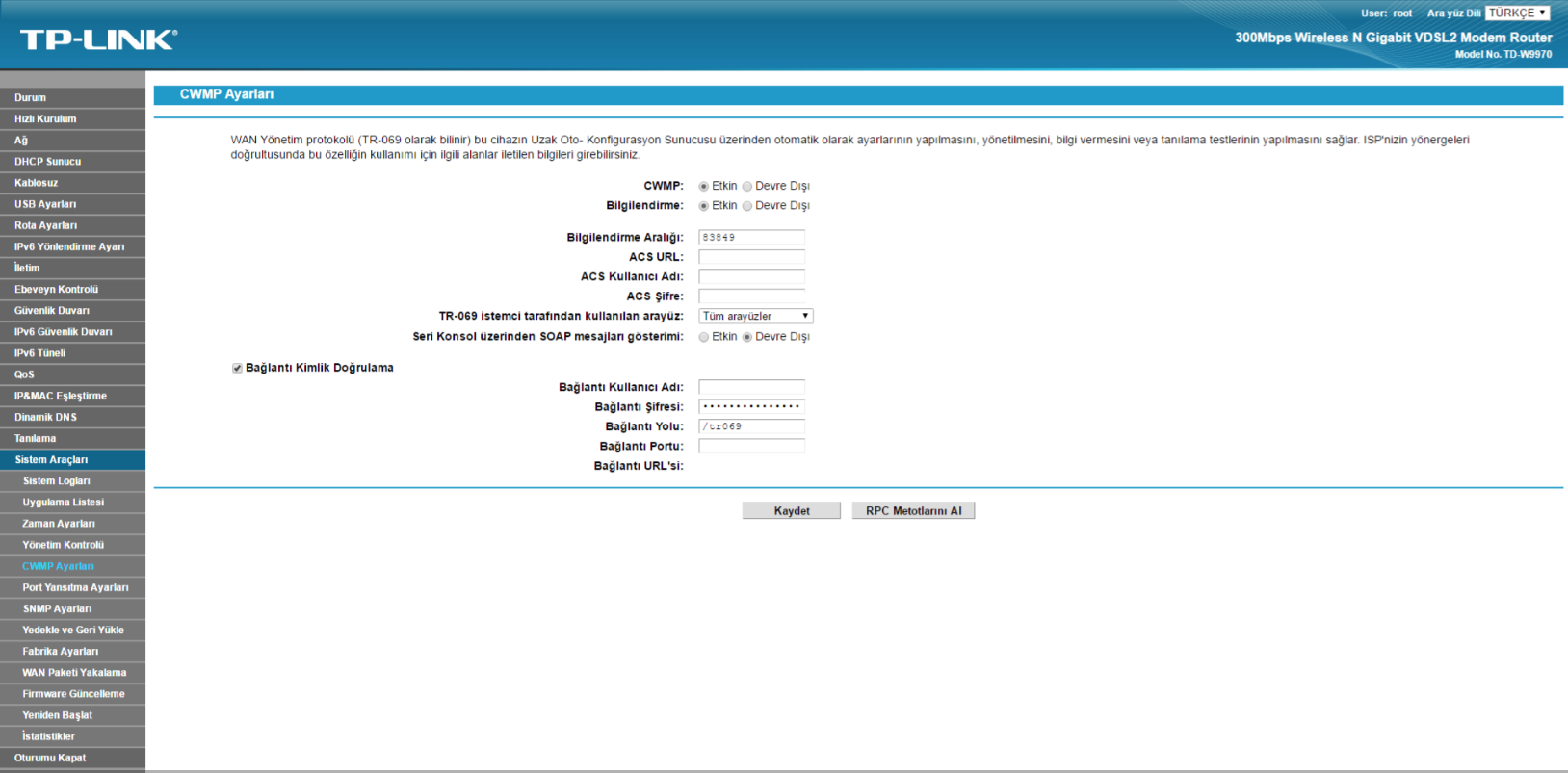
CWMP Kapatma.
Sistem Araçları CWMP Ayarları bölümüne giriniz.Buradan CWMP özelliğini kapatabilirsiniz.
Not: CWMP ayarını kapatmak için bu seçeneği gizlemişlerdir. Bunun için:
- Sayfada sağ tıklayıp “İncele” seçeneğini açınız.
- Sağ tarafta gösterilen ilgili nesneyi siliniz.
- Daha sonra işlemi uygulayınız.
Son düzenleme: