Bu konu çözüldü olarak işaretlenmiştir. Çözülmediğini düşünüyorsanız konuyu rapor edebilirsiniz.

akinyrf

Başarılı
Katılım
19 Şubat 2024
Mesajlar
14
Beğeniler
4
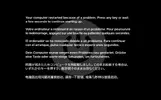
Arkadaşlar herkese selam. Bugün vmware üzerinden MacOS Sonoma kurmaya çalıştım. Kılavuz olarak da Techolay youtube kanalındaki videoda yapılanların aynısını yaptım. İlk önce en başta bir işlemci hatası verdi fakat vmx dosyasına bir ekleme yaptım ve yükleme ekranı geldi. Kurulum kısmına geçtim ve yaklaşık 1 saatte kurdu. Sıkıntı şu ki asla Başlangıç yani Masaüstü kısmı gelmiyor. Boot ediyor, logo geliyor ve kendini kapatıyor sistem. Ardından da eklediğim hata yazısı çıkıyor. Birçok şey denedim ama çözüm bulamadım. Yardım edebilecek olan varsa çok sevinirim.
 

Dosya Ekleri

  • 2024-02-18 22_07_20-macOS 14 T2 - VMware Workstation.webp
    2024-02-18 22_07_20-macOS 14 T2 - VMware Workstation.webp
    21,8 KB · Görüntüleme: 174
Çözüm
Şu anlık bir şey önermedim. Öneri Monterey kurabilirsiniz eğer denemek istiyorsanız bir sorun olmayacaktır onda.

Ancak yakın zamanda bir yöntem paylaşılır.
VMX dosyanızın sonu böyle olacak:

Kod:
cpuid.0.eax = "0000:0000:0000:0000:0000:0000:0000:1011"
cpuid.0.ebx = "0111:0101:0110:1110:0110:0101:0100:0111"
cpuid.0.ecx = "0110:1100:0110:0101:0111:0100:0110:1110"
cpuid.0.edx = "0100:1001:0110:0101:0110:1110:0110:1001"
cpuid.1.eax = "0000:0000:0000:0001:0000:0110:0111:0001"
cpuid.1.ebx = "0000:0010:0000:0001:0000:1000:0000:0000"
cpuid.1.ecx = "1000:0010:1001:1000:0010:0010:0000:0011"
cpuid.1.edx = "0000:0111:1000:1011:1111:1011:1111:1111"

Bu girdiyi sileceksiniz: featureCompat.enable = "FALSE"
virtualHW.version değerini 16 yapacaksınız.
 
VMX dosyanızın sonu böyle olacak:

Kod:
cpuid.0.eax = "0000:0000:0000:0000:0000:0000:0000:1011"
cpuid.0.ebx = "0111:0101:0110:1110:0110:0101:0100:0111"
cpuid.0.ecx = "0110:1100:0110:0101:0111:0100:0110:1110"
cpuid.0.edx = "0100:1001:0110:0101:0110:1110:0110:1001"
cpuid.1.eax = "0000:0000:0000:0001:0000:0110:0111:0001"
cpuid.1.ebx = "0000:0010:0000:0001:0000:1000:0000:0000"
cpuid.1.ecx = "1000:0010:1001:1000:0010:0010:0000:0011"
cpuid.1.edx = "0000:0111:1000:1011:1111:1011:1111:1111"

Bu girdiyi sileceksiniz: featureCompat.enable = "FALSE"
virtualHW.version değerini 16 yapacaksınız.
Yaptım ama değişen bir şey olmadı. featureCompat.enable = "FALSE" zaten yoktu. virtualHW.version kısmını da 16 yaptım ama aynı şekilde yeniden başlatıp duruyor.
 
Son düzenleyen: Moderatör:
smc.version = "0" da ekler misin? Araştırmaya devam ediyorum. Bu işlemciye Ventura kuramayıp Monterey kuranlar var.

featureCompat.enable = "TRUE" ekleyin bir de. Yukarıdaki CPU kodları hep ekli kalacak.

Sorun olursa yarın bakacağım.
 
Son düzenleme:
smc.version = "0" da ekler misin? Araştırmaya devam ediyorum. Bu işlemciye Ventura kuramayıp Monterey kuranlar var.

featureCompat.enable = “TRUE” ekleyin bir de. Yukarıdaki CPU kodları hep ekli kalacak.

Sorun olursa yarın bakacağım.
featureCompat.enable = “TRUE” kısmını hangi satıra ekleyeceğim ?

VMX dosyasının son hali böyle. Yanlış kısım varsa düzelteyim. [CODE title="vmx dosyası"].encoding = "windows-1254"
config.version = "8"
virtualHW.version = "16"
pciBridge0.present = "TRUE"
pciBridge4.present = "TRUE"
pciBridge4.virtualDev = "pcieRootPort"
pciBridge4.functions = "8"
pciBridge5.present = "TRUE"
pciBridge5.virtualDev = "pcieRootPort"
pciBridge5.functions = "8"
pciBridge6.present = "TRUE"
pciBridge6.virtualDev = "pcieRootPort"
pciBridge6.functions = "8"
pciBridge7.present = "TRUE"
pciBridge7.virtualDev = "pcieRootPort"
pciBridge7.functions = "8"
vmci0.present = "TRUE"
hpet0.present = "TRUE"
nvram = "macOS 14 T2.nvram"
virtualHW.productCompatibility = "hosted"
powerType.powerOff = "soft"
powerType.powerOn = "soft"
powerType.suspend = "soft"
powerType.reset = "soft"
displayName = "macOS 14 T2"
usb.vbluetooth.startConnected = "TRUE"
smc.present = "TRUE"
smbios.restrictSerialCharset = "TRUE"
firmware = "efi"
guestOS = "darwin23-64"
board-id.reflectHost = "FALSE"
ich7m.present = "TRUE"
tools.syncTime = "TRUE"
sound.autoDetect = "TRUE"
sound.virtualDev = "hdaudio"
sound.fileName = "-1"
sound.present = "TRUE"
numvcpus = "4"
cpuid.coresPerSocket = "4"
memsize = "10088"
sata0.present = "TRUE"
sata0:0.fileName = "macOS 14 T2.vmdk"
sata0:0.present = "TRUE"
sata0:1.deviceType = "cdrom-image"
sata0:1.fileName = "C:\Users\emirv\Downloads\macOS Sonoma 14.3 (23D56) Created by techolay\macOS Sonoma 14.3 (23D56) Created by techolay.iso"
sata0:1.present = "TRUE"
usb.present = "TRUE"
ehci.present = "TRUE"
usb_xhci.present = "TRUE"
ethernet0.connectionType = "nat"
ethernet0.addressType = "generated"
ethernet0.virtualDev = "vmxnet3"
ethernet0.present = "TRUE"
extendedConfigFile = "macOS 14 T2.vmxf"
floppy0.present = "FALSE"
board-id = "Mac-AA95B1DDAB278B95"
hw.model.reflectHost = "FALSE"
hw.model = "MacBookPro19,1"
serialNumber.reflectHost = "FALSE"
serialNumber = "C01234567890"
smc.version = "0"
cpuid.0.eax = "0000:0000:0000:0000:0000:0000:0000:1011"
cpuid.0.ebx = "0111:0101:0110:1110:0110:0101:0100:0111"
cpuid.0.ecx = "0110:1100:0110:0101:0111:0100:0110:1110"
cpuid.0.edx = "0100:1001:0110:0101:0110:1110:0110:1001"
cpuid.1.eax = "0000:0000:0000:0001:0000:0110:0111:0001"
cpuid.1.ebx = "0000:0010:0000:0001:0000:1000:0000:0000"
cpuid.1.ecx = "1000:0010:1001:1000:0010:0010:0000:0011"
cpuid.1.edx = "0000:0111:1000:1011:1111:1011:1111:1111
[/CODE]
 
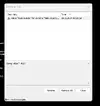
Böyle bir hata verdi. Tırnak da var mış eksik kopyalamışım sadece.
 

Dosya Ekleri

  • 2024-02-19 01_22_22-macOS 14 T2 - VMware Workstation.webp
    2024-02-19 01_22_22-macOS 14 T2 - VMware Workstation.webp
    8,6 KB · Görüntüleme: 133