
- Katılım
- 22 Aralık 2023
- Mesajlar
- 950
- Makaleler
- 1
- Çözümler
- 3
- Beğeniler
- 227
İyi akşamlar. Basit bir sağ üst köşede açılan ve belirli saniyede aniden yok olan bir popup kodladım. Nasıl olmuş?
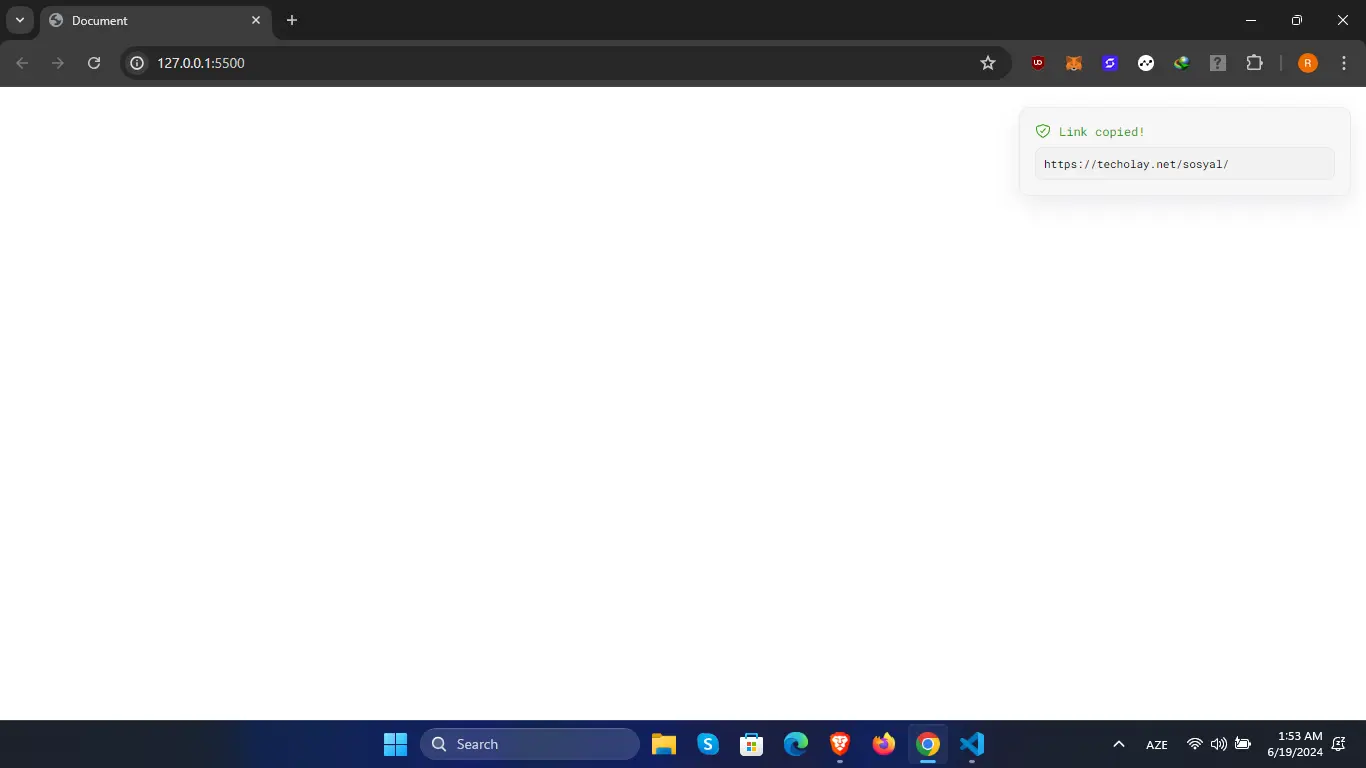
Tasarım tamamen bana ait. Herhangi alıntı falan yapılmamıştır. Sabırla kodladık!
[CODE lang="html" title="HTML"]<!DOCTYPE html>
<html lang="en">
<head>
<meta charset="UTF-8">
<meta name="viewport" content="width=device-width, initial-scale=1.0">
<title>Document</title>
<link rel="preconnect" href="https://fonts.googleapis.com">
<link rel="preconnect" href="https://fonts.gstatic.com" crossorigin>
<link href="https://fonts.googleapis.com/css2?family=Roboto+Mono:ital,wght@0,100..700;1,100..700&display=swap" rel="stylesheet">
<link rel="stylesheet" href="style.css">
</head>
<body>
<div class="notification dark">
<div class="notify-checkmark">
<ion-icon name="shield-checkmark-outline" class="checkmark"></ion-icon>
<span>Link copied!</span>
</div>
<div class="notify-content">
https://techolay.net/sosyal/
</div>
</div>
<script type="module" src="https://unpkg.com/[email protected]/dist/ionicons/ionicons.esm.js"></script>
<script nomodule src="https://unpkg.com/[email protected]/dist/ionicons/ionicons.js"></script>
</body>
</html>[/CODE]
[CODE lang="css" title="CSS"]* {
margin: 0;
padding: 0;
}
.notification {
position: absolute;
top: 20px;
right: 15px;
width: 300px;
background: rgba(247,247,247,1);
box-shadow: rgba(149, 157, 165, 0.2) 0px 8px 24px;
border-radius: 10px;
padding: 15px;
font-family: "Roboto Mono", monospace;
border: 1px solid rgba(0, 0, 0, 0.045);
}
.notify-checkmark {
display: flex;
align-items: center;
justify-content: flex-start;
}
.notify-checkmark span {
margin-left: 8px;
font-size: 12px;
color: rgba(56,158,13,1);
}
.checkmark {
color: rgba(56,158,13,1);
}
.notify-content {
margin-top: 8px;
padding: 8px;
font-size: 11px;
background-color: #f2f2f2;
border-radius: 8px;
cursor: pointer;
border: 1px solid rgba(0, 0, 0, 0.045);
}[/CODE]
[CODE lang="css" title="CSS"].dark { background-color: #1a1a1a; }[/CODE]
Ekstra olarak dark özelliği ekleyebilirsiniz. Bunun için de bir alan bıraktım CSS'de.
Tasarım tamamen bana ait. Herhangi alıntı falan yapılmamıştır. Sabırla kodladık!
[CODE lang="html" title="HTML"]<!DOCTYPE html>
<html lang="en">
<head>
<meta charset="UTF-8">
<meta name="viewport" content="width=device-width, initial-scale=1.0">
<title>Document</title>
<link rel="preconnect" href="https://fonts.googleapis.com">
<link rel="preconnect" href="https://fonts.gstatic.com" crossorigin>
<link href="https://fonts.googleapis.com/css2?family=Roboto+Mono:ital,wght@0,100..700;1,100..700&display=swap" rel="stylesheet">
<link rel="stylesheet" href="style.css">
</head>
<body>
<div class="notification dark">
<div class="notify-checkmark">
<ion-icon name="shield-checkmark-outline" class="checkmark"></ion-icon>
<span>Link copied!</span>
</div>
<div class="notify-content">
https://techolay.net/sosyal/
</div>
</div>
<script type="module" src="https://unpkg.com/[email protected]/dist/ionicons/ionicons.esm.js"></script>
<script nomodule src="https://unpkg.com/[email protected]/dist/ionicons/ionicons.js"></script>
</body>
</html>[/CODE]
[CODE lang="css" title="CSS"]* {
margin: 0;
padding: 0;
}
.notification {
position: absolute;
top: 20px;
right: 15px;
width: 300px;
background: rgba(247,247,247,1);
box-shadow: rgba(149, 157, 165, 0.2) 0px 8px 24px;
border-radius: 10px;
padding: 15px;
font-family: "Roboto Mono", monospace;
border: 1px solid rgba(0, 0, 0, 0.045);
}
.notify-checkmark {
display: flex;
align-items: center;
justify-content: flex-start;
}
.notify-checkmark span {
margin-left: 8px;
font-size: 12px;
color: rgba(56,158,13,1);
}
.checkmark {
color: rgba(56,158,13,1);
}
.notify-content {
margin-top: 8px;
padding: 8px;
font-size: 11px;
background-color: #f2f2f2;
border-radius: 8px;
cursor: pointer;
border: 1px solid rgba(0, 0, 0, 0.045);
}[/CODE]
[CODE lang="css" title="CSS"].dark { background-color: #1a1a1a; }[/CODE]
Ekstra olarak dark özelliği ekleyebilirsiniz. Bunun için de bir alan bıraktım CSS'de.


