yaşarvural

Uzman
Katılım
20 Mayıs 2024
Mesajlar
14
Beğeniler
6
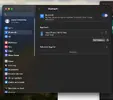
Merhaba. Başarılı Sonoma kurulumu yaptım sorun Bluetooth tüm güncel kextleri yükledim işledim. Cihaz görüyor bağlanamıyor. Yapmam gereken başka ne olabilir? Desteklerinizi bekliyorum.
 

Dosya Ekleri

  • Ekran Resmi 2024-05-20 21.16.54.webp
    Ekran Resmi 2024-05-20 21.16.54.webp
    20,5 KB · Görüntüleme: 93
Son düzenleyen: Moderatör:
Sonoma'da malesef bir Bluetooth sorunu var. Ben de Z690 sistemde çözemedim ama yine de bir yöntem paylaşacağım:

Broadcom Bluetooth'u devre dışı bırakmak ve Intel Bluetooth kullanmak istiyorsanız aşağıdakileri yapın:
  • HS14'ü etkinleştiren bir USB bağlantı noktası haritası SSDT veya Intel Bluetooth'un üzerinde olduğu USB bağlantı noktasını kullanın
    • Sizde Bluetooth USB bağlantısı HS14'te ise tabi.
  • Ya Broadcom Bluetooth'un açık olduğu USB bağlantı noktasını devre dışı bırakın ya da Broadcom Bluetooth USB kablosunun bağlantısını kesin (Varsa tabi)
  • Ardından Intel Bluetooth için bu kext'leri ekleyin:
    • BlueToolFixup.kext
    • IntelBTPatcher.kext
    • IntelBluetoothFirmware.kext
  • İlk kext (BlueToolFixup) BrcmPatchRAM paketinden edinilebilir
  • Son iki kext'ler IntelBluetooth paketinden edinilebilir
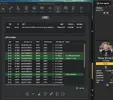
  • 3 dosyayı da EFI/OC/Kexts'e kopyalayın ve gösterildiği gibi config.plist'e ekleyin:

1716235536862.webp
 
Sonoma'da maalesef bir Bluetooth sorunu var. Ben de Z690 sistemde çözemedim ama yine de bir yöntem paylaşacağım:

Broadcom Bluetooth'u devre dışı bırakmak ve Intel Bluetooth kullanmak istiyorsanız aşağıdakileri yapın:
  • HS14'ü etkinleştiren bir USB bağlantı noktası haritası SSDT veya Intel Bluetooth'un üzerinde olduğu USB bağlantı noktasını kullanın.
    • Sizde Bluetooth USB bağlantısı HS14'te ise tabii.
  • Ya Broadcom Bluetooth'un açık olduğu USB bağlantı noktasını devre dışı bırakın ya da Broadcom Bluetooth USB kablosunun bağlantısını kesin (varsa tabii)
  • Ardından Intel Bluetooth için bu Kext'leri ekleyin:
    • BlueToolFixup.kext
    • IntelBTPatcher.kext
    • IntelBluetoothFirmware.kext
  • İlk kext (bluetoolfixup) BrcmPatchRAM paketinden edinilebilir.
  • Son iki Kext'ler IntelBluetooth paketinden edinilebilir.
  • 3 dosyayı da EFI/OC/Kexts'e kopyalayın ve gösterildiği gibi config.plist'e ekleyin:

Eki Görüntüle 48545

Recep üstadım sizi tekrardan görmek tebessüm ettirdi :)
HS14'ü etkinleştiren bir USB bağlantı noktası haritası SSDT veya Intel Bluetooth'un üzerinde olduğu USB bağlantı noktasını kullanın. Bunu nasıl yapılacağını bilmiyorum bende HS12 sanırım.

Recep üstadım sizi tekrardan görmek tebessüm ettirdi :)
HS14'ü etkinleştiren bir USB bağlantı noktası haritası SSDT veya Intel Bluetooth'un üzerinde olduğu USB bağlantı noktasını kullanın. Bunu nasıl yapılacağını bilmiyorum bende HS12 sanırım.
 

Dosya Ekleri

  • Ekran Resmi 2024-05-20 23.16.55.webp
    Ekran Resmi 2024-05-20 23.16.55.webp
    41,3 KB · Görüntüleme: 82
Son düzenleme:
Anakart neydi? Bu WiFi dahili değil mi?
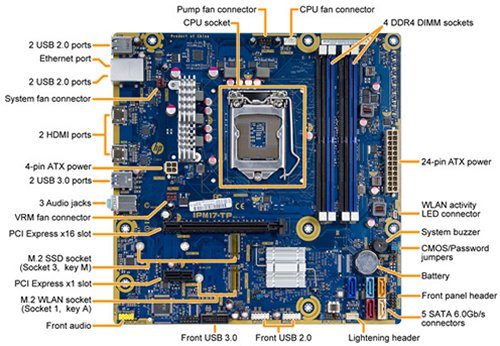
The Thimphu-K motherboard
Thimphu-K motherboard top view

Motherboard description​

  • HP name: Thimphu-K
  • SSID: 2B4B

Form Factor​

  • uATX
  • Dimensions: 24.0x24.0 cm (9.4x9.4 in)

Chipset​

  • Z170

Processor upgrade information​

  • TDP: Up to 91 W
  • Socket type: LGA 1151
  • Motherboard supports the following processor upgrades:
    Processor​
    TDP​
    Integrated Graphics​
    Intel Core i7-7700K (Kabylake) 4.2 GHz Quad Core​
    91 W​
    Integrated HD Graphics 630​
    Intel Core i7-7700 (Kabylake) 3.6 GHz Quad Core​
    65 W​
    Integrated HD Graphics 630​
    Intel Core i5-7600K (Kabylake) 3.8 GHz Quad Core​
    91 W​
    Integrated HD Graphics 630​
    Intel Core i5-7400 (Kabylake) 3.0 GHz Quad Core​
    65 W​
    Integrated HD Graphics 630​
    Intel Core i3-7100 (Kabylake) 3.9 GHz Dual Core​
    51 W​
    Integrated HD Graphics 630​

Memory upgrade information​

Video​

Integrated graphics​

Expansion Slots​

  • One PCI Express x16 (Gen 3.0)
  • One PCI Express x1 (Gen 3.0)
  • One M.2 socket 1, key A
  • One M.2 socket 3, key M

I/O Ports and Jumpers​

Back I/O ports​

NOTE:
This is the configuration as shipped. Any modifications or upgrades might change the configuration, port accessibility, and port functionality.
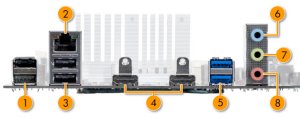
  1. Figure : Thimphu-K back I/O panel
    Thimphu-K back I/O panel
  2. USB 2.0: 2
  3. LAN (Ethernet)
  4. USB 2.0: 2
  5. HDMI out: 2
  6. USB 3.0: 2
  7. Audio: Line in
  8. Audio: Line out
  9. Audio: Microphone

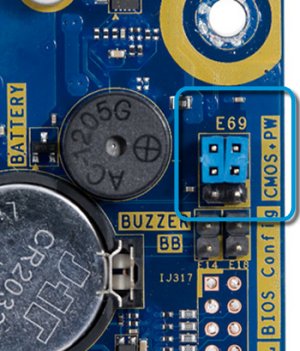
Jumpers​

Figure : Clear CMOS and clear password jumpers in the default positions
Clear CMOS and clear password jumpers in the default positions


Anakart neydi? Bu WiFi dahili değil mi?
Evet dahili.
 
Son düzenleyen: Moderatör: