Uzun zamandır telefondan bilgisayarın sesini, şarkılarını ya da açmak istediğim siteleri açmak için uygulama falan kullanıyordum. Bugün biraz da zaman geçsin diye uğraşırken kendi çapımda bir şeyler oluşturdum. Bu bir ekrana bağlanıp Windows'u yönetme uygulaması değil. Çünkü amacım daha basit PC TV'ye bağlıyken ya da bir iş yaparken müzik açıkken falan şarkı değiştirmeye ses açıp kısmaya ya da yatağa geçtim ama PC hala açıksa kapatmaya falan yarayan bir şey yapmaktı. Şarkı değiştirme ya da arama gelince uzaktaysam durdurma vs. gibi şeyler yapmak için.
Gereklilikler:
Ekliyoruz. Bu bizim üstteki dosyayı arka planda sessizce çalıştırmamıza yarayacak. Diğer türlü sürekli olarak açık bir komut penceresi görürsünüz.
Sonra bu VBA'yı zamanlanmış görevlere ekliyoruz. (Pythonun kurulu olduğu yeri ve exenin konumunu düzenlemeyi unutmayın). Bulamazsanız Where Python diye komutla sorgulayabilirsiniz.
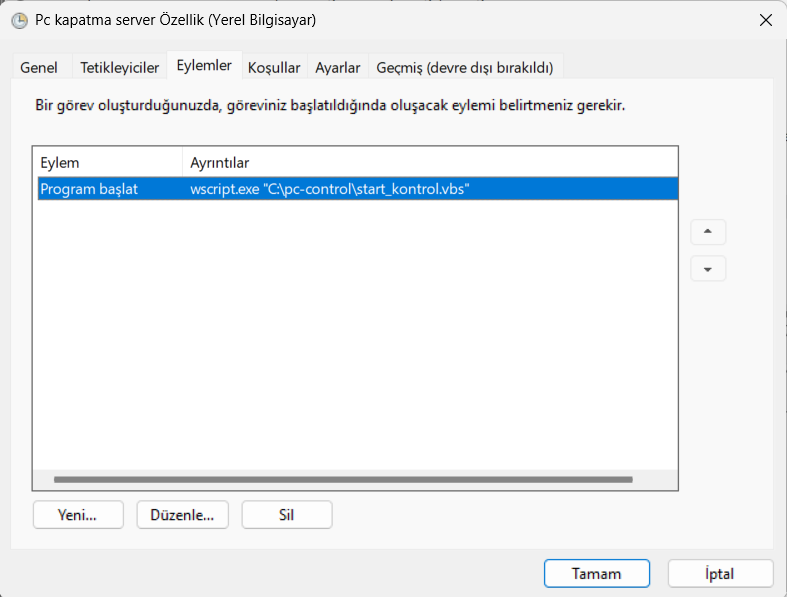
Bu şekilde olmalı. Ben oturum açılınca diye yaptım açılışı geciktirmesin diye.
Buraya kadar her şey tamamsa kendi bilgisayarınızdan http://127.0.0.1:5000/ ya da aynı ağa bağlı telefonunuzdan pcninipsi: 5000/ diye girerek kontrol paneline ulaşabilirsiniz. Çok fazla Debug yapmadım sağ olsun Claude donup durduğu için optimize etmeye de erindim.
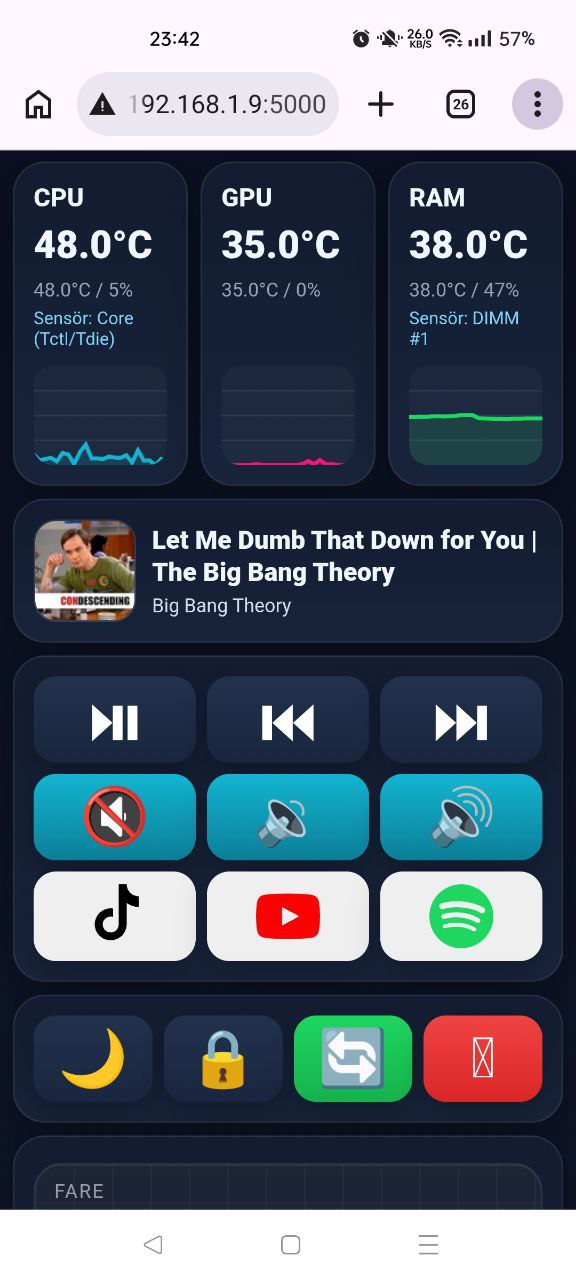
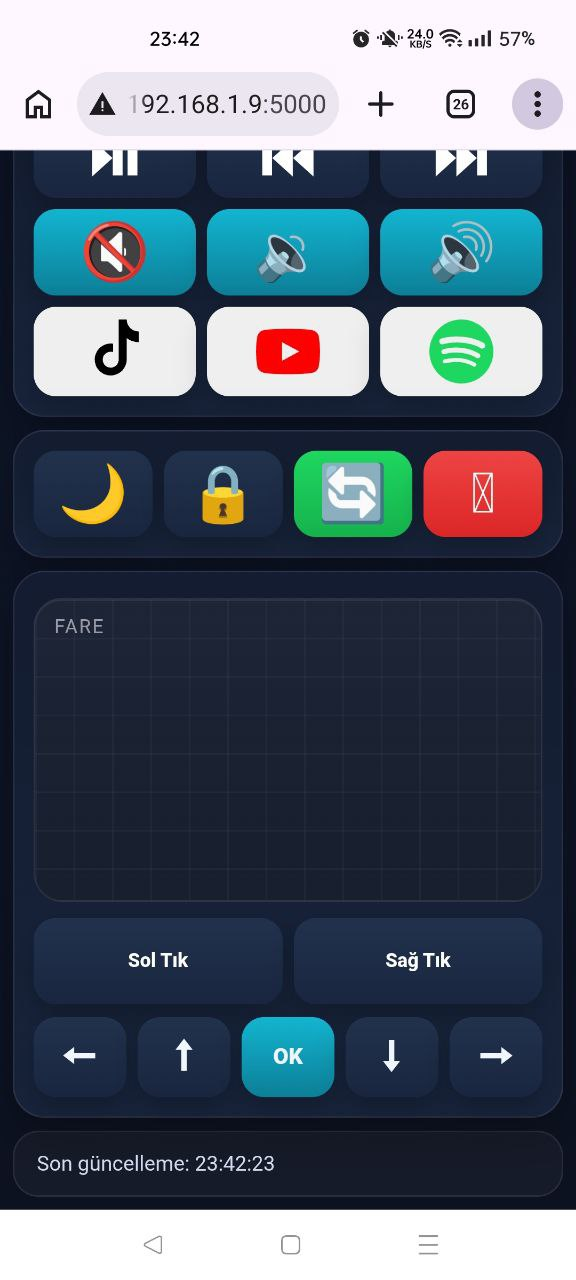
Sonuç şu şekilde bir ekran olacak. Burada aktif çalan medyayı kontrol ediyorsunuz yani YouTube'da çalıyorsa durdur deyince o durur.
Eğer webden kullanmak isterseniz tailscale kullanmanız lazım.
Tailscale PC'niz ve telefonunuza sanal bir VPN içine alır. Yani uygulamayı telefona ve PC'ye kurarsanız modemde port açmaya gerek kalmadan oradan oluşan PC ipsine telefondan erişebilirsiniz. Sol kullandığım için portla falan uğraşmak istemedim açıckası. Çoğu zaman açılmıyor zaten.
Hataları ve logları txt olarak aynı klasöre kaydediyor. Oradan kontrol edebilirsiniz.
Dediğim gibi bitmiş bir şey gibi değil de üzerinde bir şeyler yapılabilecek geliştirmeye açık bir şey olarak düşünebilirsiniz. Kendim için yaptığımdan çok fazla geliştirme beklemeyin lütfen.
Pythonda gerekli derlemeler şu şekilde
Claude aboneliğim bitmese biraz daha uğraşırdım muhtemelen ama html/css yazmaya gerçekten eriniyorum
Panel şu şekilde:
Gereklilikler:
- Python 3.12 (sonraki versiyonlar windsk ile çalışmadığı için mecbur bu sürümdeyiz) kurulumunu anlatmayacağım o apayrı ve daha uzun bir konu olur.
- Eğer localde yani aynı ağda olmadan mobil veriyle falan da bağlanmak isterseniz "tailscale" uygulaması. Uygulamayı Windows başladığında başlayacak şekilde ayarlayın.
- Sıcaklıkları görmek için librehardwaremonitor. Bu uygulamayı kurup üstten "web server" kısmında run demelisiniz. Bu uygulamayı da Windows başlangıcında çalışacak şekilde ayarlayın.
Python:
import os
import subprocess
import ctypes
import traceback
import json
import time
import asyncio
import re
import urllib.request
import base64
import psutil
import pyautogui
from aiohttp import web
WINSDK_AVAILABLE = True
try:
from winsdk.windows.media.control import GlobalSystemMediaTransportControlsSessionManager
from winsdk.windows.storage.streams import DataReader
except Exception:
WINSDK_AVAILABLE = False
PYGETWINDOW_AVAILABLE = True
try:
import pygetwindow as gw
except Exception:
PYGETWINDOW_AVAILABLE = False
PORT = 5000
BASE_DIR = r"C:\pc-control"
LOG_FILE = os.path.join(BASE_DIR, "kontrol_log.txt")
ERR_FILE = os.path.join(BASE_DIR, "kontrol_error.txt")
LHM_URL = "http://127.0.0.1:8085/data.json"
_LAST_MEDIA_ERROR_AT = 0.0
_LAST_LHM_ERROR_AT = 0.0
_ERROR_COOLDOWN_SECONDS = 60.0
pyautogui.FAILSAFE = False
pyautogui.PAUSE = 0
def log(text: str) -> None:
try:
with open(LOG_FILE, "a", encoding="utf-8") as f:
f.write(f"{time.strftime('%Y-%m-%d %H:%M:%S')} | {text}\n")
except Exception:
pass
def log_error(text: str) -> None:
try:
with open(ERR_FILE, "a", encoding="utf-8") as f:
f.write(f"{time.strftime('%Y-%m-%d %H:%M:%S')} | {text}\n")
except Exception:
pass
def throttled_media_error(text: str) -> None:
global _LAST_MEDIA_ERROR_AT
now = time.time()
if now - _LAST_MEDIA_ERROR_AT >= _ERROR_COOLDOWN_SECONDS:
_LAST_MEDIA_ERROR_AT = now
log_error(text)
def throttled_lhm_error(text: str) -> None:
global _LAST_LHM_ERROR_AT
now = time.time()
if now - _LAST_LHM_ERROR_AT >= _ERROR_COOLDOWN_SECONDS:
_LAST_LHM_ERROR_AT = now
log_error(text)
def open_url_in_chrome(url: str) -> bool:
candidates = [
r"C:\Program Files\Google\Chrome\Application\chrome.exe",
r"C:\Program Files (x86)\Google\Chrome\Application\chrome.exe",
os.path.expandvars(r"%LocalAppData%\Google\Chrome\Application\chrome.exe"),
]
for chrome_path in candidates:
try:
if os.path.exists(chrome_path):
subprocess.Popen([chrome_path, url])
return True
except Exception as e:
log_error(f"Chrome açma hatası ({chrome_path}): {e}")
try:
subprocess.Popen(['cmd', '/c', 'start', '', 'chrome', url], shell=False)
return True
except Exception as e:
log_error(f"Start chrome hatası: {e}")
return False
def open_spotify_store_app() -> bool:
methods = [
lambda: os.startfile("spotify:"),
lambda: subprocess.Popen(['cmd', '/c', 'start', '', 'spotify:'], shell=False),
lambda: subprocess.Popen(['explorer.exe', 'spotify:'], shell=False),
]
for method in methods:
try:
method()
log("Spotify Store uygulaması açma komutu gönderildi")
return True
except Exception as e:
log_error(f"Spotify açma hatası: {e}")
return False
WM_APPCOMMAND = 0x319
APPCOMMAND_VOLUME_MUTE = 0x80000
APPCOMMAND_VOLUME_DOWN = 0x90000
APPCOMMAND_VOLUME_UP = 0xA0000
def send_app_command(cmd: int) -> None:
hwnd = ctypes.windll.user32.GetForegroundWindow()
if hwnd == 0:
hwnd = 0xFFFF
ctypes.windll.user32.SendMessageW(hwnd, WM_APPCOMMAND, hwnd, cmd)
def toggle_mute() -> None:
send_app_command(APPCOMMAND_VOLUME_MUTE)
def volume_up() -> None:
send_app_command(APPCOMMAND_VOLUME_UP)
def volume_down() -> None:
send_app_command(APPCOMMAND_VOLUME_DOWN)
def media_play_pause() -> None:
pyautogui.press("playpause")
def media_next() -> None:
pyautogui.press("nexttrack")
def media_prev() -> None:
pyautogui.press("prevtrack")
def press_key(key_name: str) -> None:
pyautogui.press(key_name)
def left_click() -> None:
pyautogui.click()
def right_click() -> None:
pyautogui.click(button="right")
def get_media_info_from_windows_titles() -> dict:
if not PYGETWINDOW_AVAILABLE:
return {"title": "Medya bilgisi alınamadı", "artist": "", "art_url": None}
try:
titles = [t.strip() for t in gw.getAllTitles() if t and t.strip()]
spotify_titles = [
t for t in titles
if "spotify" in t.lower()
and "rainmeter" not in t.lower()
and ".ini" not in t.lower()
]
meaningful = []
for t in spotify_titles:
if t.lower() != "spotify":
meaningful.append(t)
if meaningful:
chosen = meaningful[0]
if " - " in chosen:
left, right = chosen.split(" - ", 1)
return {
"title": left.strip() or chosen,
"artist": right.strip(),
"art_url": None
}
return {"title": chosen, "artist": "", "art_url": None}
if spotify_titles:
return {
"title": "Spotify açık",
"artist": "Parça bilgisi pencere başlığında yok",
"art_url": None
}
return {"title": "Aktif medya oturumu bulunamadı", "artist": "", "art_url": None}
except Exception as e:
throttled_media_error(f"Pencere başlığı medya fallback hatası: {e}")
return {"title": "Medya bilgisi alınamadı", "artist": "", "art_url": None}
async def get_thumbnail_data_uri(thumbnail_ref):
if thumbnail_ref is None:
return None
try:
stream = await thumbnail_ref.open_read_async()
size = stream.size
if size == 0:
return None
reader = DataReader(stream)
await reader.load_async(size)
buffer = reader.read_buffer(size)
bytes_data = bytes(buffer)
b64 = base64.b64encode(bytes_data).decode("ascii")
content_type = getattr(stream, "content_type", None) or "image/jpeg"
return f"data:{content_type};base64,{b64}"
except Exception as e:
throttled_media_error(f"Kapak görseli hatası: {e}")
return None
async def _get_media_info_async():
if not WINSDK_AVAILABLE:
return get_media_info_from_windows_titles()
try:
manager = await GlobalSystemMediaTransportControlsSessionManager.request_async()
session = manager.get_current_session()
if session is None:
return get_media_info_from_windows_titles()
props = await session.try_get_media_properties_async()
title = getattr(props, "title", "") or ""
artist = getattr(props, "artist", "") or ""
thumbnail = getattr(props, "thumbnail", None)
art_url = await get_thumbnail_data_uri(thumbnail)
if not title and not artist:
return get_media_info_from_windows_titles()
return {
"title": title or "Parça bilgisi yok",
"artist": artist or "",
"art_url": art_url
}
except Exception as e:
throttled_media_error(f"Medya bilgisi hatası: {e}\n{traceback.format_exc()}")
return get_media_info_from_windows_titles()
def get_media_info():
try:
return asyncio.run(_get_media_info_async())
except RuntimeError:
try:
loop = asyncio.new_event_loop()
try:
return loop.run_until_complete(_get_media_info_async())
finally:
loop.close()
except Exception as e:
throttled_media_error(f"asyncio media hatası: {e}")
return get_media_info_from_windows_titles()
except Exception as e:
throttled_media_error(f"asyncio media hatası: {e}")
return get_media_info_from_windows_titles()
def get_gpu_info() -> dict:
try:
result = subprocess.run(
[
"nvidia-smi",
"--query-gpu=utilization.gpu,temperature.gpu",
"--format=csv,noheader,nounits"
],
capture_output=True,
text=True,
timeout=2,
creationflags=subprocess.CREATE_NO_WINDOW
)
if result.returncode != 0 or not result.stdout.strip():
return {"gpu_util": None, "gpu_temp": None}
line = result.stdout.strip().splitlines()[0]
parts = [x.strip() for x in line.split(",")]
return {
"gpu_util": float(parts[0]),
"gpu_temp": float(parts[1])
}
except Exception as e:
log_error(f"GPU info hatası: {e}")
return {"gpu_util": None, "gpu_temp": None}
def parse_temp_value(value):
if value is None:
return None
if isinstance(value, (int, float)):
return float(value)
match = re.search(r"(-?\d+(?:\.\d+)?)", str(value))
if match:
try:
return float(match.group(1))
except Exception:
return None
return None
def collect_temperature_sensors(node, results):
if isinstance(node, dict):
text = str(node.get("Text", "")).strip()
value = node.get("Value", "")
image_url = str(node.get("ImageURL", "")).lower()
parsed = parse_temp_value(value)
if parsed is not None:
text_l = text.lower()
if (
"temperature" in image_url
or "°" in str(value)
or "cpu" in text_l
or "ccd" in text_l
or "tdie" in text_l
or "package" in text_l
or "core max" in text_l
or "dram" in text_l
or "dimm" in text_l
or "memory" in text_l
or "ram" in text_l
):
results.append({
"text": text,
"value": parsed,
"raw": str(value)
})
for child in node.get("Children", []):
collect_temperature_sensors(child, results)
elif isinstance(node, list):
for item in node:
collect_temperature_sensors(item, results)
def get_all_temperature_sensors():
try:
with urllib.request.urlopen(LHM_URL, timeout=1.0) as response:
raw = response.read().decode("utf-8", errors="ignore")
data = json.loads(raw)
results = []
collect_temperature_sensors(data, results)
return results
except Exception as e:
log_error(f"Tüm sıcaklık sensörleri okunamadı: {e}")
return []
def score_cpu_sensor(name: str) -> int:
n = name.lower().strip()
score = 0
# EN ÖNCE Tctl/Tdie
if "tctl/tdie" in n:
score += 300
if "ccd1 (tdie)" in n:
score += 200
if "tdie" in n:
score += 180
if "cpu die" in n:
score += 150
if "cpu package" in n:
score += 120
if n == "package":
score += 100
if "core max" in n:
score += 90
# alakasız sensörleri ele
if "gpu" in n:
score -= 100
if "system" in n:
score -= 100
if "motherboard" in n:
score -= 100
if "pch" in n:
score -= 100
if "vrm" in n:
score -= 100
if "dimm" in n or "dram" in n or "memory" in n or "ram" in n:
score -= 100
return score
def score_ram_sensor(name: str) -> int:
n = name.lower().strip()
score = 0
if "dram temperature" in n:
score += 120
if "memory temperature" in n:
score += 115
if "ram temperature" in n:
score += 110
if "dimm temp" in n:
score += 105
if "dimm" in n:
score += 95
if "dram" in n:
score += 90
if "memory" in n:
score += 85
if "ram" in n:
score += 80
if "cpu" in n or "gpu" in n or "package" in n or "ccd" in n or "tdie" in n:
score -= 100
return score
def choose_best_sensor(sensors, scorer):
best = None
best_score = -10**9
for sensor in sensors:
score = scorer(sensor["text"])
if score > best_score:
best_score = score
best = sensor
if best_score <= 0:
return None
return best
def get_lhm_sensor_info() -> dict:
result = {
"cpu_temp": None,
"ram_temp": None,
"cpu_sensor_name": None,
"ram_sensor_name": None
}
try:
sensors = get_all_temperature_sensors()
cpu_sensor = choose_best_sensor(sensors, score_cpu_sensor)
ram_sensor = choose_best_sensor(sensors, score_ram_sensor)
if cpu_sensor:
result["cpu_temp"] = cpu_sensor["value"]
result["cpu_sensor_name"] = cpu_sensor["text"]
if ram_sensor:
result["ram_temp"] = ram_sensor["value"]
result["ram_sensor_name"] = ram_sensor["text"]
return result
except Exception as e:
throttled_lhm_error(f"LHM okuma hatası: {e}")
return result
def get_system_info() -> dict:
try:
cpu_percent = round(psutil.cpu_percent(interval=0.08), 1)
ram = psutil.virtual_memory()
media = get_media_info()
gpu = get_gpu_info()
lhm = get_lhm_sensor_info()
return {
"cpu_temp": lhm["cpu_temp"],
"cpu_sensor_name": lhm["cpu_sensor_name"],
"cpu_percent": cpu_percent,
"gpu_util": gpu["gpu_util"],
"gpu_temp": gpu["gpu_temp"],
"ram_percent": round(ram.percent, 1),
"ram_temp": lhm["ram_temp"],
"ram_sensor_name": lhm["ram_sensor_name"],
"media_title": media.get("title", "Bilgi yok"),
"media_artist": media.get("artist", ""),
"media_art_url": media.get("art_url", None)
}
except Exception as e:
log_error(f"System info hatası: {e}\n{traceback.format_exc()}")
return {
"cpu_temp": None,
"cpu_sensor_name": None,
"cpu_percent": None,
"gpu_util": None,
"gpu_temp": None,
"ram_percent": None,
"ram_temp": None,
"ram_sensor_name": None,
"media_title": "Bilgi alınamadı",
"media_artist": "",
"media_art_url": None
}
def run_command(path: str):
log(f"Komut geldi: {path}")
if path == "/shutdown":
os.system("shutdown /s /t 0")
return True, "Kapatma komutu gönderildi"
if path == "/restart":
os.system("shutdown /r /t 0")
return True, "Yeniden başlatma komutu gönderildi"
if path == "/sleep":
os.system("rundll32.exe powrprof.dll,SetSuspendState 0,1,0")
return True, "Uyku komutu gönderildi"
if path == "/lock":
ctypes.windll.user32.LockWorkStation()
return True, "Kilitleme komutu gönderildi"
if path == "/spotify":
ok = open_spotify_store_app()
return ok, "Spotify açıldı" if ok else "Spotify açılamadı"
if path == "/shorts":
ok = open_url_in_chrome("https://www.youtube.com/shorts")
return ok, "YouTube Shorts Chrome'da açıldı" if ok else "YouTube Shorts açılamadı"
if path == "/tiktok":
ok = open_url_in_chrome("https://www.tiktok.com/")
return ok, "TikTok Chrome'da açıldı" if ok else "TikTok açılamadı"
if path == "/mute":
toggle_mute()
return True, "Ses aç/kapat komutu gönderildi"
if path == "/volup":
volume_up()
return True, "Ses artırıldı"
if path == "/voldown":
volume_down()
return True, "Ses azaltıldı"
if path == "/playpause":
media_play_pause()
return True, "Oynat/duraklat komutu gönderildi"
if path == "/next":
media_next()
return True, "Sonraki şarkı komutu gönderildi"
if path == "/prev":
media_prev()
return True, "Önceki şarkı komutu gönderildi"
if path == "/up":
press_key("up")
return True, "Yukarı tuşu gönderildi"
if path == "/down":
press_key("down")
return True, "Aşağı tuşu gönderildi"
if path == "/left":
press_key("left")
return True, "Sol tuşu gönderildi"
if path == "/right":
press_key("right")
return True, "Sağ tuşu gönderildi"
if path == "/ok":
press_key("enter")
return True, "Enter tuşu gönderildi"
if path == "/click":
left_click()
return True, "Sol tık gönderildi"
if path == "/rightclick":
right_click()
return True, "Sağ tık gönderildi"
return False, "Bilinmeyen komut"
HTML_PAGE = r"""
<!DOCTYPE html>
<html lang="tr">
<head>
<meta charset="UTF-8">
<meta name="viewport" content="width=device-width, initial-scale=1.0, maximum-scale=1.0, user-scalable=no, viewport-fit=cover">
<title>PC Kontrol</title>
<style>
:root{
--panel:#131c30;
--panel2:#18243c;
--text:#eff6ff;
--muted:#94a3b8;
--line:rgba(255,255,255,.08);
--cyan:#13b5d1;
--cyan2:#0d7f98;
--pink:#ff1478;
--pink2:#d60f64;
--amber:#ffb400;
--amber2:#db9b00;
--green:#1ed760;
--green2:#16b34d;
--red:#ef4444;
--red2:#dc2626;
--orange:#f97316;
--orange2:#ea580c;
}
*{
box-sizing:border-box;
-webkit-tap-highlight-color:transparent;
}
html, body{
touch-action:manipulation;
}
button{
touch-action:manipulation;
}
body{
margin:0;
padding:8px;
color:var(--text);
font-family:Inter,Segoe UI,Arial,sans-serif;
background:linear-gradient(180deg,#0a1020,#0d1425 55%,#0c1220);
}
.wrap{max-width:1100px;margin:0 auto;}
.hero,.card{
background:linear-gradient(180deg,var(--panel),var(--panel2));
border:1px solid var(--line);
border-radius:20px;
box-shadow:0 10px 30px rgba(0,0,0,.25);
}
.hero{padding:12px 14px;margin-bottom:8px;}
.hero h1{margin:0;font-size:22px;}
.grid{
display:grid;
grid-template-columns:repeat(12,1fr);
gap:8px;
}
.card{padding:12px;}
.span4{grid-column:span 4;}
.span6{grid-column:span 6;}
.span12{grid-column:span 12;}
.stat-label{
color:var(--muted);
font-size:13px;
letter-spacing:.12em;
text-transform:uppercase;
margin-bottom:6px;
}
.stat-value{
font-size:24px;
font-weight:900;
margin-bottom:6px;
}
.stat-meta{
color:var(--muted);
font-size:12px;
line-height:1.35;
}
.sensor-name{
color:#7dd3fc;
font-size:11px;
margin-top:3px;
line-height:1.2;
height:28px;
overflow:hidden;
display:-webkit-box;
-webkit-line-clamp:2;
-webkit-box-orient:vertical;
word-break:break-word;
}
.chart-wrap{
height:62px;
margin-top:8px;
}
.chart-wrap canvas{
width:100%;
height:100%;
display:block;
border-radius:12px;
background:rgba(255,255,255,.03);
}
.section-title{
margin:0 0 6px 0;
font-size:16px;
font-weight:800;
}
.section-sub{
color:var(--muted);
font-size:11px;
margin-bottom:10px;
}
.now-playing{
display:grid;
grid-template-columns:64px 1fr;
gap:10px;
align-items:center;
}
.cover{
width:64px;
height:64px;
border-radius:14px;
object-fit:cover;
background:rgba(255,255,255,.06);
border:1px solid var(--line);
display:block;
}
.media-info{
min-width:0;
}
.song-title{
font-size:16px;
font-weight:900;
margin-bottom:4px;
line-height:1.25;
word-break:break-word;
display:-webkit-box;
-webkit-line-clamp:2;
-webkit-box-orient:vertical;
overflow:hidden;
}
.song-artist{
font-size:12px;
color:#d4deec;
margin-bottom:0;
word-break:break-word;
display:-webkit-box;
-webkit-line-clamp:2;
-webkit-box-orient:vertical;
overflow:hidden;
}
.btn-grid-3{
display:grid;
grid-template-columns:repeat(3, minmax(0, 1fr));
gap:7px;
}
.btn-grid-4{
display:grid;
grid-template-columns:repeat(4, minmax(0, 1fr));
gap:7px;
}
.pill{
width:100%;
min-height:54px;
border:none;
border-radius:14px;
padding:8px 6px;
display:flex;
flex-direction:column;
align-items:center;
justify-content:center;
text-align:center;
color:#fff;
font-size:12px;
font-weight:800;
line-height:1.1;
cursor:pointer;
box-shadow:0 8px 18px rgba(0,0,0,.22);
transition:
transform 0.08s ease,
box-shadow 0.08s ease,
filter 0.08s ease,
opacity 0.08s ease;
gap:4px;
}
.pill-icon{
font-size:35px;
line-height:1;
}
.pill:active,
.pill.pressed{
transform:translateY(2px) scale(.975);
filter:brightness(.93);
box-shadow:inset 0 3px 9px rgba(0,0,0,.34);
}
.cyan{background:linear-gradient(180deg,var(--cyan),var(--cyan2));}
.pink{background:linear-gradient(180deg,var(--pink),var(--pink2));}
.amber{background:linear-gradient(180deg,var(--amber),var(--amber2));color:#231800;}
.green{background:linear-gradient(180deg,var(--green),var(--green2));color:#082610;}
.dark{background:linear-gradient(180deg,#22324d,#1a2640);}
.red{background:linear-gradient(180deg,var(--red),var(--red2));}
.orange{background:linear-gradient(180deg,var(--orange),var(--orange2));}
.statusbar{
margin-top:8px;
padding:12px 14px;
border-radius:16px;
border:1px solid var(--line);
background:rgba(255,255,255,.04);
color:#d0dbeb;
font-size:13px;
}
.touchpad{
position:relative;
width:100%;
height:190px;
border-radius:18px;
border:1px solid var(--line);
background:
linear-gradient(180deg, rgba(255,255,255,.06), rgba(255,255,255,.03)),
linear-gradient(180deg,#0f172a,#111827);
box-shadow:inset 0 1px 0 rgba(255,255,255,.04);
overflow:hidden;
touch-action:none;
user-select:none;
margin-top:4px;
}
.touchpad::before{
content:"";
position:absolute;
inset:0;
background:
linear-gradient(rgba(255,255,255,.035) 1px, transparent 1px),
linear-gradient(90deg, rgba(255,255,255,.035) 1px, transparent 1px);
background-size:24px 24px;
pointer-events:none;
}
.touchpad-label{
position:absolute;
left:12px;
top:10px;
color:rgba(255,255,255,.55);
font-size:12px;
letter-spacing:.08em;
text-transform:uppercase;
pointer-events:none;
}
.touchpad-actions{
display:grid;
grid-template-columns:1fr 1fr;
gap:7px;
margin-top:10px;
}
.dpad-row{
display:grid;
grid-template-columns:repeat(5, minmax(0, 1fr));
gap:7px;
margin-top:8px;
}
.dpad-btn{
min-height:50px;
border:none;
border-radius:14px;
background:linear-gradient(180deg,#22324d,#1a2640);
color:#eff6ff;
font-size:22px;
font-weight:900;
box-shadow:0 8px 18px rgba(0,0,0,.22);
cursor:pointer;
transition:
transform 0.08s ease,
box-shadow 0.08s ease,
filter 0.08s ease,
opacity 0.08s ease;
}
.dpad-btn:active,
.dpad-btn.pressed{
transform:translateY(2px) scale(.965);
filter:brightness(.93);
box-shadow:inset 0 3px 9px rgba(0,0,0,.34);
}
.dpad-ok{
background:linear-gradient(180deg,var(--cyan),var(--cyan2));
font-size:14px;
}
@media (max-width:860px){
.span6{grid-column:span 12;}
}
@media (max-width:560px){
body{padding:8px;}
.hero{padding:12px 14px;}
.hero h1{font-size:22px;}
.grid{gap:8px;}
.card{padding:12px;}
.span6{grid-column:span 12;}
.btn-grid-3{
grid-template-columns:repeat(3, minmax(0, 1fr));
gap:7px;
}
.btn-grid-4{
grid-template-columns:repeat(4, minmax(0, 1fr));
gap:7px;
}
.touchpad-actions{
grid-template-columns:1fr 1fr;
gap:7px;
}
.dpad-row{
grid-template-columns:repeat(5, minmax(0, 1fr));
gap:7px;
}
}
</style>
</head>
<body>
<div class="wrap">
<div class="grid">
<div class="card span4">
<div class="section-title">CPU</div>
<div class="stat-value" id="cpuTemp">-</div>
<div class="stat-meta" id="cpuMeta">Sıcaklık / Kullanım</div>
<div class="sensor-name" id="cpuSensorName"></div>
<div class="chart-wrap"><canvas id="cpuChart"></canvas></div>
</div>
<div class="card span4">
<div class="section-title">GPU</div>
<div class="stat-value" id="gpuTemp">-</div>
<div class="stat-meta" id="gpuMeta">Sıcaklık / Kullanım</div>
<div class="sensor-name"></div>
<div class="chart-wrap"><canvas id="gpuChart"></canvas></div>
</div>
<div class="card span4">
<div class="section-title">RAM</div>
<div class="stat-value" id="ramTemp">-</div>
<div class="stat-meta" id="ramMeta">Sıcaklık / Kullanım</div>
<div class="sensor-name" id="ramSensorName"></div>
<div class="chart-wrap"><canvas id="ramChart"></canvas></div>
</div>
<div class="card span12">
<div class="now-playing">
<img id="coverArt" class="cover" alt="" />
<div class="media-info">
<div class="song-title" id="mediaTitle">Parça bilgisi yükleniyor...</div>
<div class="song-artist" id="mediaArtist"></div>
</div>
</div>
</div>
<div class="card span6">
<div class="btn-grid-3">
<button class="pill dark pressable" data-path="/playpause"><span class="pill-icon">⏯</span></button>
<button class="pill dark pressable" data-path="/prev"><span class="pill-icon">⏮</span></button>
<button class="pill dark pressable" data-path="/next"><span class="pill-icon">⏭</span></button>
<button class="pill cyan pressable" data-path="/mute"><span class="pill-icon">🔇</span></button>
<button class="pill cyan pressable" data-path="/voldown"><span class="pill-icon">🔉</span></button>
<button class="pill cyan pressable" data-path="/volup"><span class="pill-icon">🔊</span></button>
<button class="pill pressable" data-path="/tiktok"><svg class="pill-icon" viewBox="0 0 24 24" width="40" height="40" fill="#000000">
<path d="M21 8.5a7.5 7.5 0 01-4.5-1.5V15a6 6 0 11-6-6c.3 0 .6 0 .9.1v3.1a3 3 0 10 2.1 2.9V0h3a4.5 4.5 0 004.5 4.5v4z"/>
</svg></button>
<button class="pill pressable" data-path="/shorts">
<svg class="pill-icon" viewBox="0 0 24 24" width="40" height="40" fill="#FF0000">
<path d="M23.5 6.2a3 3 0 00-2.1-2.1C19.6 3.5 12 3.5 12 3.5s-7.6 0-9.4.6A3 3 0 00.5 6.2 31.4 31.4 0 000 12a31.4 31.4 0 00.5 5.8 3 3 0 002.1 2.1c1.8.6 9.4.6 9.4.6s7.6 0 9.4-.6a3 3 0 002.1-2.1A31.4 31.4 0 0024 12a31.4 31.4 0 00-.5-5.8zM9.75 15.5v-7l6.5 3.5-6.5 3.5z"/></button>
<button class="pill black pressable" data-path="/spotify">
<svg class="pill-icon" viewBox="0 0 24 24" width="40" height="40" fill="#1ED760">
<path d="M12 0C5.37 0 0 5.37 0 12s5.37 12 12 12 12-5.37 12-12S18.63 0 12 0zm5.52 17.34a.75.75 0 01-1.03.25c-2.82-1.72-6.37-2.11-10.55-1.16a.75.75 0 11-.33-1.46c4.54-1.03 8.44-.59 11.68 1.38.36.22.47.68.23.99zm1.47-3.27a.94.94 0 01-1.29.31c-3.23-1.98-8.15-2.56-11.97-1.41a.94.94 0 11-.54-1.8c4.36-1.32 9.78-.67 13.47 1.59.44.27.58.85.33 1.31zm.13-3.41c-3.87-2.3-10.26-2.51-13.96-1.38a1.13 1.13 0 11-.66-2.17c4.25-1.29 11.31-1.04 15.77 1.63a1.13 1.13 0 11-1.15 1.92z"/>
</svg></button>
</div>
</div>
<div class="card span6">
<div class="btn-grid-4">
<button class="pill dark pressable" data-path="/sleep"><span class="pill-icon">🌙</span></button>
<button class="pill dark pressable" data-path="/lock"><span class="pill-icon">🔒︎</span></button>
<button class="pill green pressable" data-path="/restart" data-confirm="Bilgisayar yeniden başlatılsın mı?"><span class="pill-icon">🔄</span></button>
<button class="pill red pressable" data-path="/shutdown" data-confirm="Bilgisayar kapatılsın mı?"><span class="pill-icon">⏻</span></button>
</div>
</div>
<div class="card span12">
<div id="touchpad" class="touchpad">
<div class="touchpad-label">Fare</div>
</div>
<div class="touchpad-actions">
<button class="pill dark pressable" data-path="/click"><span>Sol Tık</span></button>
<button class="pill dark pressable" data-path="/rightclick"><span>Sağ Tık</span></button>
</div>
<div class="dpad-row">
<button class="dpad-btn pressable" data-path="/left">←</button>
<button class="dpad-btn pressable" data-path="/up">↑</button>
<button class="dpad-btn dpad-ok pressable" data-path="/ok">OK</button>
<button class="dpad-btn pressable" data-path="/down">↓</button>
<button class="dpad-btn pressable" data-path="/right">→</button>
</div>
</div>
</div>
<div class="statusbar" id="status">Hazır</div>
</div>
<script>
const historySize = 24;
const cpuHistory = [];
const gpuHistory = [];
const ramHistory = [];
let mouseSocket = null;
let socketReady = false;
let pendingMoveX = 0;
let pendingMoveY = 0;
let socketFlushTimer = null;
function pushHistory(arr, value){
arr.push(value ?? 0);
if(arr.length > historySize) arr.shift();
}
function fmtTemp(v){
return (v === null || v === undefined) ? "Yok" : v.toFixed(1) + "°C";
}
function fmtPercent(v){
return (v === null || v === undefined) ? "Yok" : v.toFixed(0) + "%";
}
function drawChart(canvasId, data, lineColor){
const canvas = document.getElementById(canvasId);
if(!canvas) return;
const w = Math.max(10, Math.floor(canvas.clientWidth));
const h = Math.max(10, Math.floor(canvas.clientHeight));
const dpr = window.devicePixelRatio || 1;
canvas.width = Math.floor(w * dpr);
canvas.height = Math.floor(h * dpr);
const ctx = canvas.getContext('2d');
// Her çizimde context'i sıfırla
ctx.setTransform(1, 0, 0, 1, 0, 0);
ctx.clearRect(0, 0, canvas.width, canvas.height);
// CSS piksel alanında çiz
ctx.scale(dpr, dpr);
ctx.strokeStyle = 'rgba(255,255,255,0.08)';
ctx.lineWidth = 1;
for(let i = 1; i <= 3; i++){
const y = (h / 4) * i;
ctx.beginPath();
ctx.moveTo(0, y);
ctx.lineTo(w, y);
ctx.stroke();
}
if(data.length < 2) return;
ctx.beginPath();
data.forEach((v, i) => {
const x = (w / (historySize - 1)) * i;
const y = h - (Math.max(0, Math.min(100, v)) / 100) * h;
if(i === 0) ctx.moveTo(x, y);
else ctx.lineTo(x, y);
});
ctx.strokeStyle = lineColor;
ctx.lineWidth = 2.5;
ctx.stroke();
ctx.lineTo(w, h);
ctx.lineTo(0, h);
ctx.closePath();
ctx.fillStyle = lineColor.replace('1)', '0.14)');
ctx.fill();
}
function setPressed(el, pressed){
if(!el) return;
if(pressed) el.classList.add('pressed');
else el.classList.remove('pressed');
}
function pulseButton(el, ms=120){
if(!el) return;
setPressed(el, true);
setTimeout(() => setPressed(el, false), ms);
}
async function go(path){
const status = document.getElementById('status');
status.textContent = "Gönderiliyor: " + path;
try{
const response = await fetch(path);
const text = await response.text();
status.textContent = text;
setTimeout(refreshInfo, 350);
}catch(err){
status.textContent = "Hata: " + err;
}
}
function confirmAction(path, message){
if(confirm(message)){ go(path); }
}
async function refreshInfo(){
try{
const response = await fetch('/status');
const data = await response.json();
document.getElementById('cpuTemp').textContent = fmtTemp(data.cpu_temp);
document.getElementById('cpuMeta').textContent =
fmtTemp(data.cpu_temp) + " / " + fmtPercent(data.cpu_percent);
document.getElementById('cpuSensorName').textContent =
data.cpu_sensor_name ? ("Sensör: " + data.cpu_sensor_name) : "";
document.getElementById('gpuTemp').textContent = fmtTemp(data.gpu_temp);
document.getElementById('gpuMeta').textContent =
fmtTemp(data.gpu_temp) + " / " + fmtPercent(data.gpu_util);
document.getElementById('ramTemp').textContent = fmtTemp(data.ram_temp);
document.getElementById('ramMeta').textContent =
fmtTemp(data.ram_temp) + " / " + fmtPercent(data.ram_percent);
document.getElementById('ramSensorName').textContent =
data.ram_sensor_name ? ("Sensör: " + data.ram_sensor_name) : "";
document.getElementById('mediaTitle').textContent = data.media_title || "Parça bilgisi yok";
document.getElementById('mediaArtist').textContent = data.media_artist || "";
const cover = document.getElementById('coverArt');
const noMedia =
!data.media_title ||
data.media_title === "Aktif medya oturumu bulunamadı" ||
data.media_title === "Medya bilgisi alınamadı" ||
data.media_title === "Bilgi alınamadı";
if(data.media_art_url && !noMedia){
cover.src = data.media_art_url;
cover.style.display = 'block';
} else {
cover.removeAttribute('src');
cover.style.display = 'none';
}
const nowPlaying = document.querySelector('.now-playing');
if(data.media_art_url && !noMedia){
nowPlaying.style.gridTemplateColumns = '64px 1fr';
} else {
nowPlaying.style.gridTemplateColumns = '1fr';
}
pushHistory(cpuHistory, data.cpu_percent);
pushHistory(gpuHistory, data.gpu_util);
pushHistory(ramHistory, data.ram_percent);
drawChart('cpuChart', cpuHistory, 'rgba(19,181,209,1)');
drawChart('gpuChart', gpuHistory, 'rgba(255,20,120,1)');
drawChart('ramChart', ramHistory, 'rgba(30,215,96,1)');
document.getElementById('status').textContent =
"Son güncelleme: " + new Date().toLocaleTimeString('tr-TR');
}catch(err){
document.getElementById('status').textContent =
"Bilgi yenileme hatası: " + err;
}
}
function setupButtons(){
const buttons = document.querySelectorAll('.pressable');
buttons.forEach(btn => {
btn.addEventListener('pointerdown', () => setPressed(btn, true));
btn.addEventListener('pointerup', () => setPressed(btn, false));
btn.addEventListener('pointerleave', () => setPressed(btn, false));
btn.addEventListener('pointercancel', () => setPressed(btn, false));
btn.addEventListener('click', () => {
const path = btn.dataset.path;
const confirmMessage = btn.dataset.confirm;
if(path && confirmMessage){
pulseButton(btn);
confirmAction(path, confirmMessage);
return;
}
if(path){
pulseButton(btn);
go(path);
}
});
});
}
function connectMouseSocket(){
const protocol = location.protocol === 'https:' ? 'wss:' : 'ws:';
const wsUrl = protocol + '//' + location.host + '/ws/mouse';
mouseSocket = new WebSocket(wsUrl);
mouseSocket.onopen = () => {
socketReady = true;
document.getElementById('status').textContent = 'Mouse WebSocket bağlı';
};
mouseSocket.onclose = () => {
socketReady = false;
setTimeout(connectMouseSocket, 1200);
};
mouseSocket.onerror = () => {
socketReady = false;
};
mouseSocket.onmessage = (event) => {
try{
const msg = JSON.parse(event.data);
if(msg.type === 'mouse-status' && msg.message){
document.getElementById('status').textContent = msg.message;
}
}catch(_){}
};
}
function flushMouseSocket(){
socketFlushTimer = null;
if(!socketReady || !mouseSocket || mouseSocket.readyState !== WebSocket.OPEN){
pendingMoveX = 0;
pendingMoveY = 0;
return;
}
const dx = Math.round(pendingMoveX);
const dy = Math.round(pendingMoveY);
pendingMoveX = 0;
pendingMoveY = 0;
if(dx === 0 && dy === 0) return;
mouseSocket.send(JSON.stringify({
type: 'move',
dx: dx,
dy: dy
}));
}
function queueMouseMove(dx, dy){
pendingMoveX += dx;
pendingMoveY += dy;
if(!socketFlushTimer){
socketFlushTimer = setTimeout(flushMouseSocket, 8);
}
}
function setupTouchpad(){
const pad = document.getElementById('touchpad');
if(!pad) return;
let active = false;
let lastX = 0;
let lastY = 0;
let tapTimer = null;
let touchStartX = 0;
let touchStartY = 0;
let touchMoved = false;
const speed = 1.35;
pad.addEventListener('pointerdown', (e) => {
active = true;
lastX = e.clientX;
lastY = e.clientY;
touchStartX = e.clientX;
touchStartY = e.clientY;
touchMoved = false;
try{
pad.setPointerCapture(e.pointerId);
}catch(_){}
});
pad.addEventListener('pointermove', (e) => {
if(!active) return;
const rawDx = e.clientX - lastX;
const rawDy = e.clientY - lastY;
lastX = e.clientX;
lastY = e.clientY;
if(Math.abs(e.clientX - touchStartX) > 8 || Math.abs(e.clientY - touchStartY) > 8){
touchMoved = true;
}
const dx = rawDx * speed;
const dy = rawDy * speed;
if(dx !== 0 || dy !== 0){
queueMouseMove(dx, dy);
}
});
function stopPad(){
active = false;
flushMouseSocket();
}
pad.addEventListener('pointerup', () => {
stopPad();
if(touchMoved) return;
if(tapTimer){
clearTimeout(tapTimer);
tapTimer = null;
go('/click');
return;
}
tapTimer = setTimeout(() => {
tapTimer = null;
}, 220);
});
pad.addEventListener('pointercancel', stopPad);
pad.addEventListener('lostpointercapture', stopPad);
pad.addEventListener('contextmenu', (e) => e.preventDefault());
pad.addEventListener('dblclick', (e) => {
e.preventDefault();
go('/click');
});
}
window.addEventListener('load', () => {
setTimeout(() => {
drawChart('cpuChart', cpuHistory, 'rgba(19,181,209,1)');
drawChart('gpuChart', gpuHistory, 'rgba(255,20,120,1)');
drawChart('ramChart', ramHistory, 'rgba(30,215,96,1)');
}, 100);
});
window.addEventListener('resize', () => {
requestAnimationFrame(() => {
drawChart('cpuChart', cpuHistory, 'rgba(19,181,209,1)');
drawChart('gpuChart', gpuHistory, 'rgba(255,20,120,1)');
drawChart('ramChart', ramHistory, 'rgba(30,215,96,1)');
});
});
setupButtons();
connectMouseSocket();
setupTouchpad();
refreshInfo();
setInterval(refreshInfo, 2000);
</script>
</body>
</html>
"""
async def handle_root(request):
return web.Response(text=HTML_PAGE, content_type="text/html")
async def handle_status(request):
data = await asyncio.to_thread(get_system_info)
return web.json_response(data, dumps=lambda x: json.dumps(x, ensure_ascii=False))
async def handle_temps(request):
data = await asyncio.to_thread(get_all_temperature_sensors)
return web.json_response(data, dumps=lambda x: json.dumps(x, ensure_ascii=False))
async def handle_command(request):
path = request.path
ok, msg = await asyncio.to_thread(run_command, path)
if ok:
return web.Response(text=msg, content_type="text/plain")
return web.Response(text=f"Komut başarısız oldu: {path} | {msg}", status=400, content_type="text/plain")
async def handle_mouse_ws(request):
ws = web.WebSocketResponse(heartbeat=20)
await ws.prepare(request)
await ws.send_json({"type": "mouse-status", "message": "Mouse WebSocket hazır"})
try:
async for msg in ws:
if msg.type == web.WSMsgType.TEXT:
try:
payload = json.loads(msg.data)
except Exception:
continue
if payload.get("type") == "move":
dx = int(payload.get("dx", 0))
dy = int(payload.get("dy", 0))
if dx != 0 or dy != 0:
def move_mouse():
x, y = pyautogui.position()
pyautogui.moveTo(x + dx, y + dy, duration=0)
await asyncio.to_thread(move_mouse)
elif payload.get("type") == "click":
await asyncio.to_thread(left_click)
elif payload.get("type") == "rightclick":
await asyncio.to_thread(right_click)
elif msg.type == web.WSMsgType.ERROR:
log_error(f"WebSocket hata: {ws.exception()}")
except Exception as e:
log_error(f"Mouse WebSocket handler hatası: {e}\n{traceback.format_exc()}")
finally:
await ws.close()
return ws
def create_app():
app = web.Application(client_max_size=1024 * 1024)
app.router.add_get("/", handle_root)
app.router.add_get("/status", handle_status)
app.router.add_get("/temps", handle_temps)
app.router.add_get("/ws/mouse", handle_mouse_ws)
for route in [
"/shutdown", "/restart", "/sleep", "/lock",
"/spotify", "/shorts", "/tiktok",
"/mute", "/volup", "/voldown",
"/playpause", "/next", "/prev",
"/up", "/down", "/left", "/right", "/ok",
"/click", "/rightclick"
]:
app.router.add_get(route, handle_command)
return app
if __name__ == "__main__":
try:
os.makedirs(BASE_DIR, exist_ok=True)
log("WebSocket sürümü script başladı")
app = create_app()
web.run_app(app, host="0.0.0.0", port=PORT)
except Exception as e:
log_error(f"HATA OLUŞTU: {e}\n{traceback.format_exc()}")
Kod:
Set WshShell = CreateObject("WScript.Shell")
WshShell.Run """C:\Users\Ozgur\AppData\Local\Microsoft\WindowsApps\python.exe"" ""C:\pc-control\kontrol.py""", 0, FalseSonra bu VBA'yı zamanlanmış görevlere ekliyoruz. (Pythonun kurulu olduğu yeri ve exenin konumunu düzenlemeyi unutmayın). Bulamazsanız Where Python diye komutla sorgulayabilirsiniz.
Bu şekilde olmalı. Ben oturum açılınca diye yaptım açılışı geciktirmesin diye.
Buraya kadar her şey tamamsa kendi bilgisayarınızdan http://127.0.0.1:5000/ ya da aynı ağa bağlı telefonunuzdan pcninipsi: 5000/ diye girerek kontrol paneline ulaşabilirsiniz. Çok fazla Debug yapmadım sağ olsun Claude donup durduğu için optimize etmeye de erindim.
Sonuç şu şekilde bir ekran olacak. Burada aktif çalan medyayı kontrol ediyorsunuz yani YouTube'da çalıyorsa durdur deyince o durur.
Eğer webden kullanmak isterseniz tailscale kullanmanız lazım.
Tailscale PC'niz ve telefonunuza sanal bir VPN içine alır. Yani uygulamayı telefona ve PC'ye kurarsanız modemde port açmaya gerek kalmadan oradan oluşan PC ipsine telefondan erişebilirsiniz. Sol kullandığım için portla falan uğraşmak istemedim açıckası. Çoğu zaman açılmıyor zaten.
Hataları ve logları txt olarak aynı klasöre kaydediyor. Oradan kontrol edebilirsiniz.
Dediğim gibi bitmiş bir şey gibi değil de üzerinde bir şeyler yapılabilecek geliştirmeye açık bir şey olarak düşünebilirsiniz. Kendim için yaptığımdan çok fazla geliştirme beklemeyin lütfen.
Pythonda gerekli derlemeler şu şekilde
Python:
pip install aiohttp psutil pyautogui pygetwindow winsdkClaude aboneliğim bitmese biraz daha uğraşırdım muhtemelen ama html/css yazmaya gerçekten eriniyorum
Panel şu şekilde:
Son düzenleyen: Moderatör: