Bu konu çözüldü olarak işaretlenmiştir. Çözülmediğini düşünüyorsanız konuyu rapor edebilirsiniz.

shockedblackguy

Üstün
Katılım
27 Ocak 2024
Mesajlar
1.103
Çözümler
6
Beğeniler
834
@bicy Merhaba hocam,

Diğer yazılarınızı gördüm ve benim yaşadığım soruna benzer bir sorun fakat hata kodu farklı, FC24 oynarken bir anda başlıkta yazan mavi ekran hatasını alıyorum ve sistem kendini BIOS'a atıyor. Attıktan sonra ise SSD gözükmüyor ve yeniden başlattığımda Windows'a geri dönüyorum. Tüm sürücüler ve Windows güncel.

Sistem ve Windows sürüm bilgisi:
  • Edisyon: Windows 10 Pro
  • Sürüm: 22H2
  • İS derlemesi: 19045.5011
  • Deneyim: Windows Feature Experience Pack 1000.19060.1000.0

Sistem özellikleri:
  • Ryzen 5 5600
  • Galax Dual 1-Click OC 4060Ti 8GB
  • MSI B550M-PRO-VDH
  • XPG Gammix D35 3200Mhz CL16 4x8 32GB DDR4
  • XPG Spectrix S40G 1TB
  • SanDisk SSDPlus 480GB
  • Thermalright Phantom Spirit 120SE RGB
  • MSI MAG-A550BN 550W 80+ Bronze
  • Bitfenix Nova Mesh SE.
Aynı hata 17 Eylül 2024 civarı BF1 oynarken de meydana gelmişti ve format ile çözmüştüm. Şimdi tekrar başladı. Donanım hatası olduğunu düşünmüyorum çünkü diğer oyunlarda böyle sorunlar yaşamıyorum. Sadece Black Ops 6 açılırken 1 defa mavi ekran yemeden kendi kendini kapattı ve aynı şekilde BIOS'a attıktan sonra SSD görmedi fakat sadece bir kere oldu. FC24'te ise 2 gün üst üste oluyor, yaklaşık yarım saat oynuyorum maçın ortalarında bir anda donuyor birkaç dakika bekledikten sonra mavi ekran geliyor. Mavi ekran geldikten sonra ise %0'da takılı kalıp minidump dosyası oluşturmadan BIOS'a atıyor belirttiğim gibi. Windows XPG S40G'ye kurulu.

Windows olay görüntüleyicisinde de bir sürü hata var:
'{ burada bir sürü farklı karakter yer alıyor}' kapsayıcısı için meta veri hazırlama işlemi başarısız oldu, sonuç=0x80070490. Bu sorunlar da bir şeyin işareti mi?

Ne yapmamı önerirsiniz? Yardımcı olabilirseniz çok mutlu olurum, kafayı yemek üzereyim :/ .
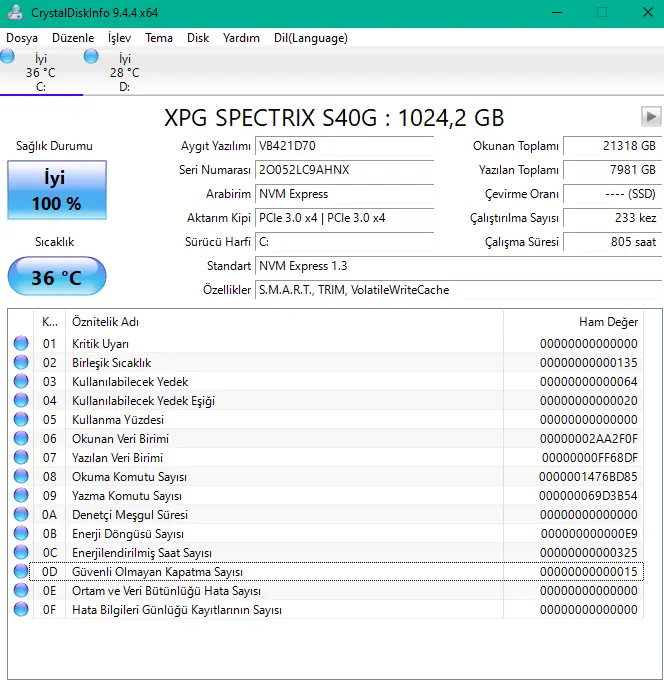
1731184529035.webp

Oyun ve Win10 kurulu olan diskin değerleri bu şekilde.
 
Son düzenleme:
Çözüm
En büyük kanıt bilgisayarının durumu zaten. En basitinden KERNEL_DATA_INPAGE_ERROR hatasının Microsoft makalesi büyük bir kanıt niteliği taşıyor.


Rich (BB code):
Cause
Frequently, you can determine the cause of the KERNEL_DATA_INPAGE_ERROR bug check from the error status (parameter 2). These are NTSTATUS Values.

Some common status codes include:
  1. 0xC000009A, or STATUS_INSUFFICIENT_RESOURCES, indicates a lack of non-paged pool resources.
  2. 0xC000009C, or STATUS_DEVICE_DATA_ERROR, typically indicates bad blocks (sectors) on the hard disk.
  3. 0xC000009D, or STATUS_DEVICE_NOT_CONNECTED, indicates defective or loose cabling, termination, or that the controller doesn't see the hard disk.
  4. 0xC000016A, or STATUS_DISK_OPERATION_FAILED, indicates bad blocks (sectors) on the hard disk.
  5. 0xC0000185, or STATUS_IO_DEVICE_ERROR, indicates improper termination or defective cabling on SCSI devices or that two devices are trying to use the same IRQ.
  6. 0xC000000E, or STATUS_NO_SUCH_DEVICE, indicates a hardware failure or an incorrect drive configuration. Check your cables and check the drive with the diagnostic utility available from your drive manufacturer. If you're using older PATA (IDE) drives, this status code can indicate an incorrect master/subordinate drive configuration.
These status codes are the most common ones that have specific causes. For more information about other possible status codes that can be returned for a specific version of Windows, see the Ntstatus.h file in the Microsoft Windows Driver Kit (WDK). Another common cause of this error message is defective storage hardware or failing RAM memory. A virus infection can also cause this bug check.

Bu hatanın bugüne kadar RAM'den çıktığına nadir bir virüsten çıktığına da hiç şahit olmadım. Genelde depolama hatasının bir ürünü, Microsoft'un da belirttiği gibi.

Ek bir kanıt sunacaksan da bilgisayarına farklı bir disk tak ve bu diski çıkar. Sorunlar kesilir.
UNEXPECTED_STORE_EXCEPTION
KERNEL_DATA_INPAGE_ERROR

Bu ikili de birer disk hatasının varlığına işaret ediyor. Önceki konuda WHEA direkt olarak buna işaret etmiyor olsa da bunlar ediyorlar. Dosyan olmadığı için bakamıyorum ama muhtemelen de öyledir.
CHKDSK ile onardıktan sonra da olduğuna göre (başka bir şey kalmadı zaten) diskteki tüm verileri silip garantiye göndermek en iyi seçenek olur sanırım. Bu SSD'den kurtulmalıyım, alırken de içime sinmemişti zaten. Fiyatı uygun diye aldım. Vatan Bilgisayar sorun yok diye gönderirse nasıl kanıtlayabilirim ki?

Dosya olmaması ve direkt BIOS'ta gözükmemesi çöktükten sonra bana çok garip ve anlamsız geliyor zaten. Cidden bir sıkıntı var.
 
En büyük kanıt bilgisayarının durumu zaten. En basitinden KERNEL_DATA_INPAGE_ERROR hatasının Microsoft makalesi büyük bir kanıt niteliği taşıyor.


Rich (BB code):
Cause
Frequently, you can determine the cause of the KERNEL_DATA_INPAGE_ERROR bug check from the error status (parameter 2). These are NTSTATUS Values.

Some common status codes include:
  1. 0xC000009A, or STATUS_INSUFFICIENT_RESOURCES, indicates a lack of non-paged pool resources.
  2. 0xC000009C, or STATUS_DEVICE_DATA_ERROR, typically indicates bad blocks (sectors) on the hard disk.
  3. 0xC000009D, or STATUS_DEVICE_NOT_CONNECTED, indicates defective or loose cabling, termination, or that the controller doesn't see the hard disk.
  4. 0xC000016A, or STATUS_DISK_OPERATION_FAILED, indicates bad blocks (sectors) on the hard disk.
  5. 0xC0000185, or STATUS_IO_DEVICE_ERROR, indicates improper termination or defective cabling on SCSI devices or that two devices are trying to use the same IRQ.
  6. 0xC000000E, or STATUS_NO_SUCH_DEVICE, indicates a hardware failure or an incorrect drive configuration. Check your cables and check the drive with the diagnostic utility available from your drive manufacturer. If you're using older PATA (IDE) drives, this status code can indicate an incorrect master/subordinate drive configuration.
These status codes are the most common ones that have specific causes. For more information about other possible status codes that can be returned for a specific version of Windows, see the Ntstatus.h file in the Microsoft Windows Driver Kit (WDK). Another common cause of this error message is defective storage hardware or failing RAM memory. A virus infection can also cause this bug check.

Bu hatanın bugüne kadar RAM'den çıktığına nadir bir virüsten çıktığına da hiç şahit olmadım. Genelde depolama hatasının bir ürünü, Microsoft'un da belirttiği gibi.

Ek bir kanıt sunacaksan da bilgisayarına farklı bir disk tak ve bu diski çıkar. Sorunlar kesilir.
 
Çözüm
En büyük kanıt bilgisayarının durumu zaten. En basitinden KERNEL_DATA_INPAGE_ERROR hatasının Microsoft makalesi büyük bir kanıt niteliği taşıyor.


Rich (BB code):
Cause
Frequently, you can determine the cause of the KERNEL_DATA_INPAGE_ERROR bug check from the error status (parameter 2). These are NTSTATUS Values.

Some common status codes include:

0xC000009A, or STATUS_INSUFFICIENT_RESOURCES, indicates a lack of non-paged pool resources.

0xC000009C, or STATUS_DEVICE_DATA_ERROR, typically indicates bad blocks (sectors) on the hard disk.

0xC000009D, or STATUS_DEVICE_NOT_CONNECTED, indicates defective or loose cabling, termination, or that the controller doesn't see the hard disk.

0xC000016A, or STATUS_DISK_OPERATION_FAILED, indicates bad blocks (sectors) on the hard disk.

0xC0000185, or STATUS_IO_DEVICE_ERROR, indicates improper termination or defective cabling on SCSI devices or that two devices are trying to use the same IRQ.

0xC000000E, or STATUS_NO_SUCH_DEVICE, indicates a hardware failure or an incorrect drive configuration. Check your cables and check the drive with the diagnostic utility available from your drive manufacturer. If you're using older PATA (IDE) drives, this status code can indicate an incorrect master/subordinate drive configuration.

These status codes are the most common ones that have specific causes. For more information about other possible status codes that can be returned for a specific version of Windows, see the Ntstatus.h file in the Microsoft Windows Driver Kit (WDK). OSR a third party, offers a PDF document that maps NTSTATUS to Win32 Error codes NTSTATUS to Win32 Error Code Mappings

Another common cause of this error message is defective storage hardware or failing RAM memory.

A virus infection can also cause this bug check.

Bu hatanın bugüne kadar RAM'den çıktığına nadir bir virüsten çıktığına da hiç şahit olmadım. Genelde depolama hatasının bir ürünü, Microsoft'un da belirttiği gibi.
Her şey için teşekkürler hocam. 480'lik SATA SSD'me geçici olarak Win11 kurup bu arkadaşı garantiye yollayacağım, bir şey çıkmazsa ne derim bilmiyorum. Bu durumu belirtip satarım herhalde. Buradaki mesajları göstersem ikna olmazlar herhalde.
 
Buradaki mesajlar bir kanıt sunmazlar çünkü bir inceleme dosyamız yok. Bir dosya inceleyebilsek kanıt da sunabilirdin. Yine de bu durumları belirtirsen yardımcı olacaklardır. Mesajın genel görünüme yeni açıldı bu arada, bundan dolayı şimdi cevap veriyorum.
 
Buradaki mesajlar bir kanıt sunmazlar çünkü bir inceleme dosyamız yok. Bir dosya inceleyebilsek kanıt da sunabilirdin. Yine de bu durumları belirtirsen yardımcı olacaklardır. Mesajın genel görünüme yeni açıldı bu arada, bundan dolayı şimdi cevap veriyorum.
Tamamdır, süreç hakkında bilgilendireceğim. Şimdi Windows 11 dosyası oluşturuyorum. Böyle bir sorun yaşayan insanlar için yardımcı olur belki. Tekrar teşekkür ederim.

Vatan Bilgisayar aracılığıyla garantiye gitti ve sonuç olarak S40G 1TB bozuk çıktı. Bugün iade aldım mağazadan. Aynı modelde aynı sorunu yaşayan arkadaşlar garantiye göndersin. Hatanın detaylarını öğrenemedim fakat bu SSD sıkıntılı.

@bicy sorun tamamen çözüldü hocam. Teşekkürler.
 
Son düzenleme:
